












Spotting access risk takes too long.
A user's access is spread across profiles, permission sets, sharing rules, and role hierarchy.No single screen shows the full picture. No signal tells you which access carries risk. Manual investigation is slow. Some access risk inevitably gets missed.
Access Risk Score pinpoints priorities.
Select a user. See their risk score instantly.
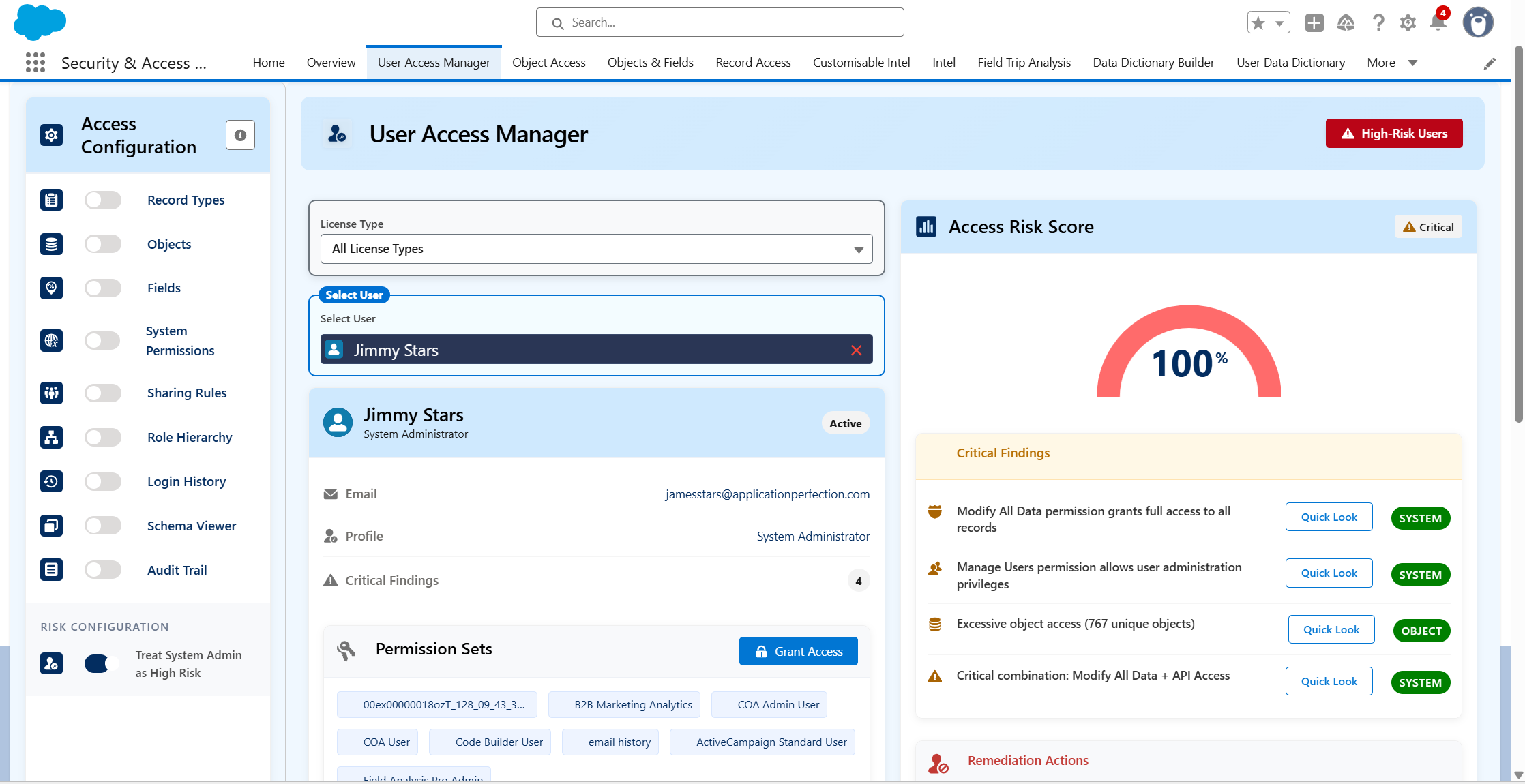
Ultimate User Manager. Every user's access, risk, and activity in one screen.
Setup assigns access.Ultimate User Manager exposes it.
Faster reviews, clearer risk, faster action.


Access Risk Scorefor every user
Instantly see elevated access combinationsthe moment you open a user profile.

Full user access picturein one view
No more piecing together accessfrom multiple sources.

Customise what counts as risk
Define critical permissions and tailor risk assessments to your organisation's security priorities.

Grant and revoke fromthe same screen
Move from flagged risk to resolution, in one place.
Over-permissioned users are a security risk.Ultimate User Manager flags them.
Hours of digging
One user assessment
with Ultimate User Manager
"Especially critical when you are using Salesforce both internally and/or managing your customers and prospect access through Experience Cloud deployments."


Simon Thompson

Investigating user access in Setup takes time you don't have.
Here's where that gap shows up across eight common permissions tasks.
Salesforce Setup
With Ultimate User Manager
Seeing a user'sfull access profile
Click through profile, each permission set, sharing rules, and role hierarchy separately

Complete access breakdown in one screen; objects, fields, system permissions, sharing rules
Identifying over-permissioned users
No native risk signal or flag

Access Risk Score flags high-risk assignments automatically
Granting or revoking a permission set
Navigate to user record, then permission set assignments separately

Add or remove permission sets directly
from the review screen
Reviewinglogin activity
Run login history separately from the access review

Login history sits alongside the access profile in the same view
Checking fieldaccess for a user
Trace field permissions through every profile and permission set the user holds
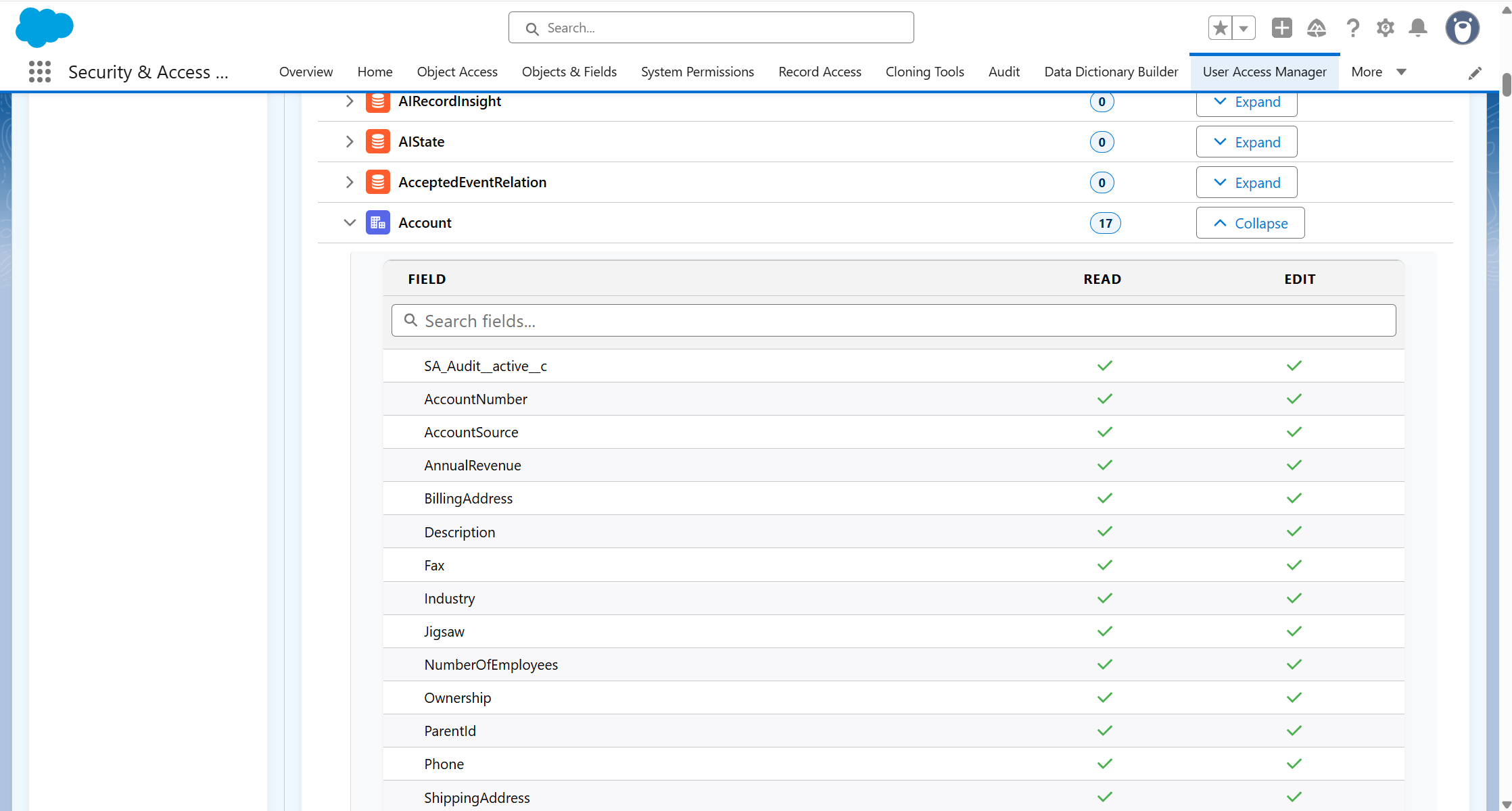
Field access resolved for that user and listed in one place
Checking sharing& role inheritance
Cross-reference role hierarchy, sharing rules, and public groups by hand
Sharing and role-derived access shown as part of the access profile
Producing evidence for a user review
Screenshots or manual exports from several Setup areas
Export the full user access report to Excel in one action
Offboarding or rolechange checks
Work through each assignment to confirm nothing is left behind
Every assignment for the user on one screen, revoke from the same place
Customising risk assessments
Standard User Access Summary does not provide configurable user-risk scoring

Define critical permissions, customise risk checks and tailor assessments to your organisation
Six ways to do what setup can't
Bring a user’s access information together in one configurable view. Review their assigned permission sets, record types, object and field access, system permissions, sharing rules, role hierarchy, login history and audit activity without moving between multiple areas of Salesforce Setup.
See a clear percentage risk score and Critical, High, Medium or Low classification for each user. Ultimate User Manager highlights powerful permissions, excessive object access and risky permission combinations. Quick Look opens the relevant access section and highlights the permission involved.
Review users across the Salesforce organisation by risk score, risk level and number of critical findings. Sort the results to identify who requires attention, then open any user directly for a detailed access review.
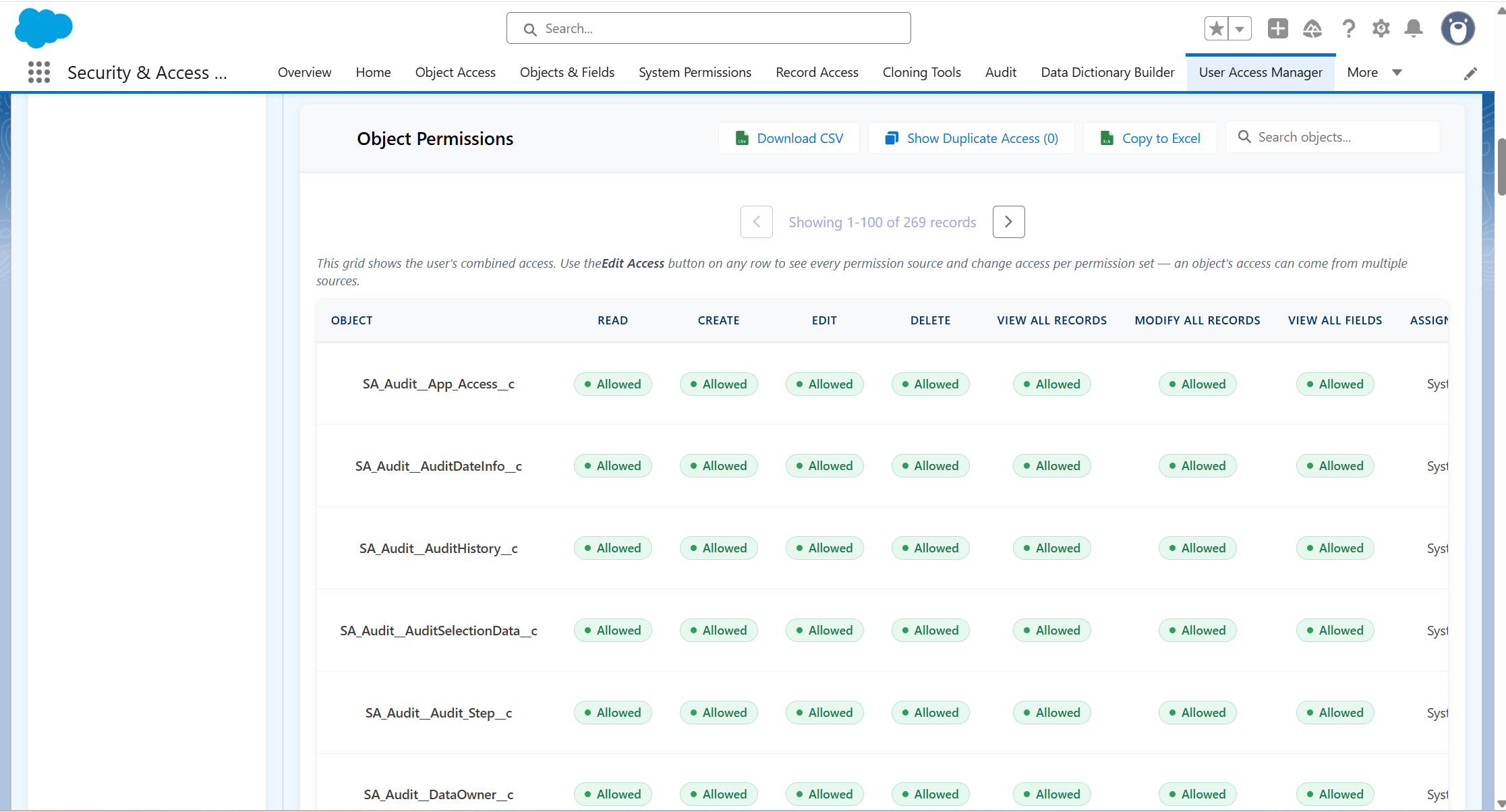
See the access a user actually has after their profile, permission sets and permission-set groups are combined. Identify duplicate access, trace object permissions back to every contributing source and edit supported permissions directly.
Assign multiple licence-compatible permission sets to a user, or analyse existing assignments by risk before selectively revoking them. Written recommendations and permission-level findings help administrators make more informed remediation decisions.
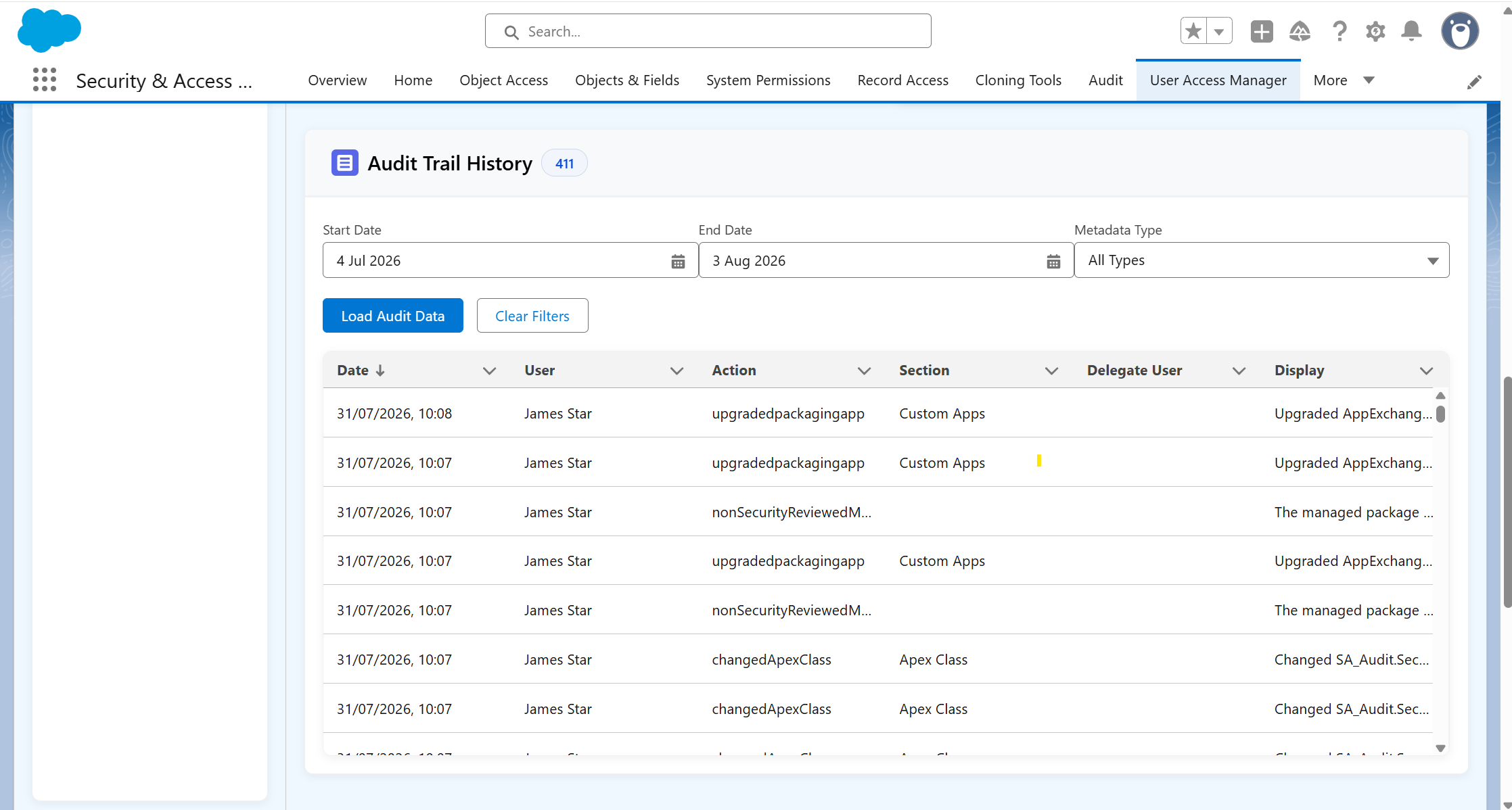
Review successful and unsuccessful login attempts, including IP address, application, browser and platform details. User-specific Setup Audit Trail changes can also be filtered by date and metadata type for focused investigation.
- Complete User Access Overview
View a selected user’s profile, status, assigned permission sets, record types, object access, field access, system permissions and other access information in one place. - User Access Risk Scoring
Assign each user a percentage risk score and Critical, High, Medium or Low classification based on powerful permissions, excessive access and risky permission combinations. - Critical Findings and Quick Investigation
Highlight specific access risks and use Quick Look to open the relevant permission section, scroll directly to the issue and show where the access originates. - Organisation-Wide High-Risk User Analysis
Compare users across the Salesforce organisation by risk score, risk level and critical findings, then open any user for detailed analysis. - Effective Object and Field Access Visibility
See the access a user actually has after their profile, permission sets and permission-set groups are combined, including object permissions and field-level Read and Edit access. - Access Source Tracing and Duplicate Detection
Trace object access back to the profiles and permission sets granting it, identify objects receiving duplicate access from multiple sources and review each contributing source. - Direct Object Permission Management
Edit supported object permissions from the access analysis, with immediate updates and safeguards that prevent invalid Salesforce permission combinations.
- Permission Set Assignment and Revocation
Assign multiple licence-compatible permission sets to a user or review existing assignments before selectively revoking them. - Risk-Based Permission Set Remediation
Classify assigned permission sets by risk, show the permissions contributing to each rating and provide written recommendations to support removal decisions. - Record Type and Record Access Analysis
Review record-type availability, applicable sharing rules and access inherited through the selected user’s role hierarchy. - System Permission Visibility
See every enabled system permission held by the user and all profiles or permission sets contributing to it. - Login and Audit History
Review login attempts, statuses, IP addresses, applications, browsers and platforms alongside user-specific Salesforce Setup Audit Trail changes. - Search and Export Tools
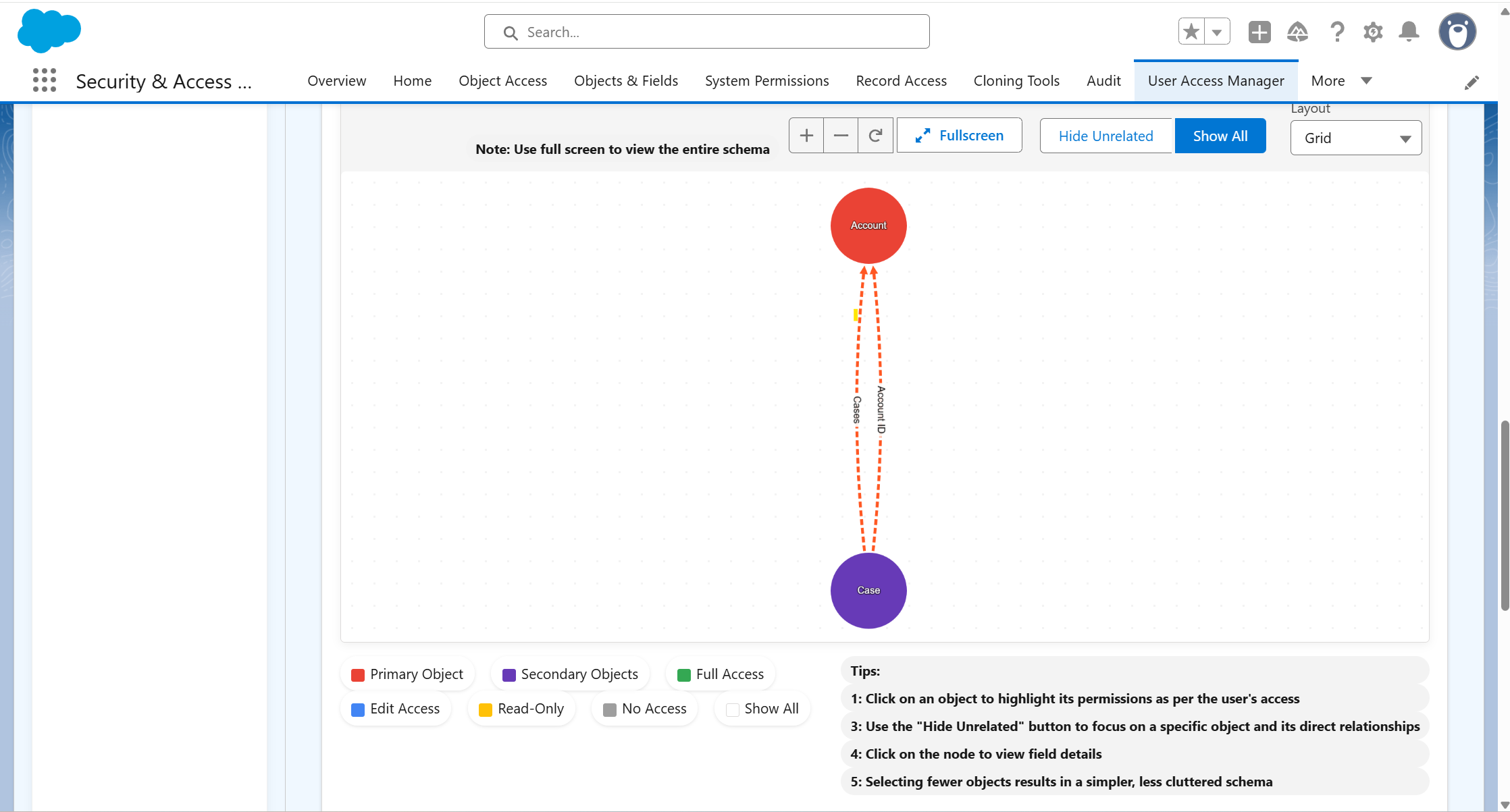
Search object and field access results and export detailed object, field and sharing information for offline review and documentation. - Schema Access Visualisation
Visualise Salesforce object relationships and colour-code objects according to the selected user’s effective access level.
Want to understand how it improves your workflow? Book a tailored demo
30 min walkthrough. No prep needed
One screen. Complete user review.

1
Select a user
Choose any user in your org to begin the review.

2
See the full picture
Access profile, risk score, and login history assembled in one view.

3
Assess the risk
Risk Score guides the review toward the highest-risk assignments.
4
Act and report
Grant or revoke access. Export findings for compliance or security.
Ultimate User Manager is one part of a broader governance picture
Ultimate User Manager controls access risk.The Suite brings the rest of your governance work into line.
Part of the Security + Access Manager Suite
Eight apps. One workflow covering permissions, users, audits, reports, and metadata.Ultimate User Manager can be installed as a standalone app or as part of the full suite.
Ready to stop chasing permissions across Setup?
In a tailored demo we'll show you:
• How the Access Risk Score identifies over-permissioned users in your org• How the user snapshot view replaces hours of manual Setup investigation• How it connects to the wider suite for complete access governance
30 minutes. No prep needed. No credit card required.