













Permissions get complicated fast.
Access reviews slow. Record access questions become investigations.Audit evidence gets rebuilt from scratch every quarter.Meanwhile permissions debt accumulates, silently, and at scale.
One Unified View cuts through this.
Quickly compare user access side by side
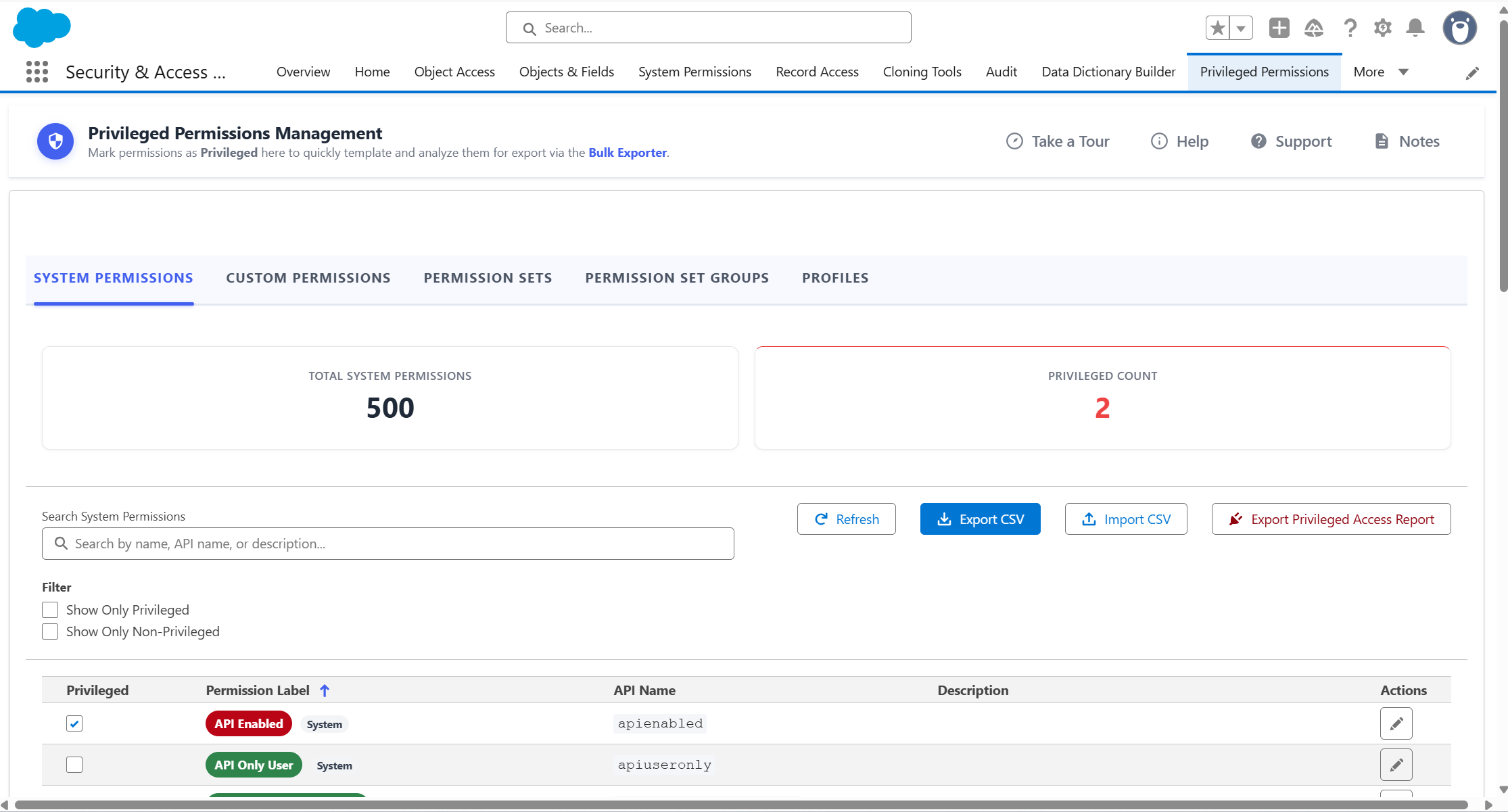
One workspace for permission reviews, bulk updates, and audit exports.
Setup configures.Permissions Manager Pro governs.
Faster reviews, safer changes, cleaner evidence.


Compare useraccess side-by-side
Access questions answered withoutopening a single Setup screen.

Bulk permission changeswith rollback built in.
Update at scale without therisk of getting it wrong.

One clickto Excel
All permissions dataconsolidated in one file.

Audit-ready.Every review cycle.
Same scope, same format,every cycle.
Permissions debt is a security risk.Permissions Manager Pro is how you address it.
3 Weeks
Under 2 Days
with Permissions Manager Pro
"All we have to do is supply the user and the Record ID, and Permissions Manager Pro tells us all the reasons a user has visibility to that particular record."


Stephanie Poorman

Setup wasn't built forrepeatable governance
Here's where that gap shows up across eight common permissions tasks.
Salesforce Setup
With Permissions Manager Pro
Bulk Changes
Open each profile or permission set individually across multiple setup screens
Apply consistent changes across multiple
assignments in one action.
Every profile updated. Zero screen switching.
InvestigatingUser Access
Edit one profile or permission setat a time, manually repeated

Paste a Record ID, click Go
Every access reason in one view.
Tracking whatchanged & when
No native change log forpermission edits
Every save generates a log entry.
Revert to any previous state.
Reviewing permissionsacross assignments
Open each profile or permission set individually across multiple setup screens
Compare profiles, permission sets, and permission set groups in a single matrix.
All assignments, one screen.
Reviewingfield-level security
Review field permissions one profile or permission set at a time
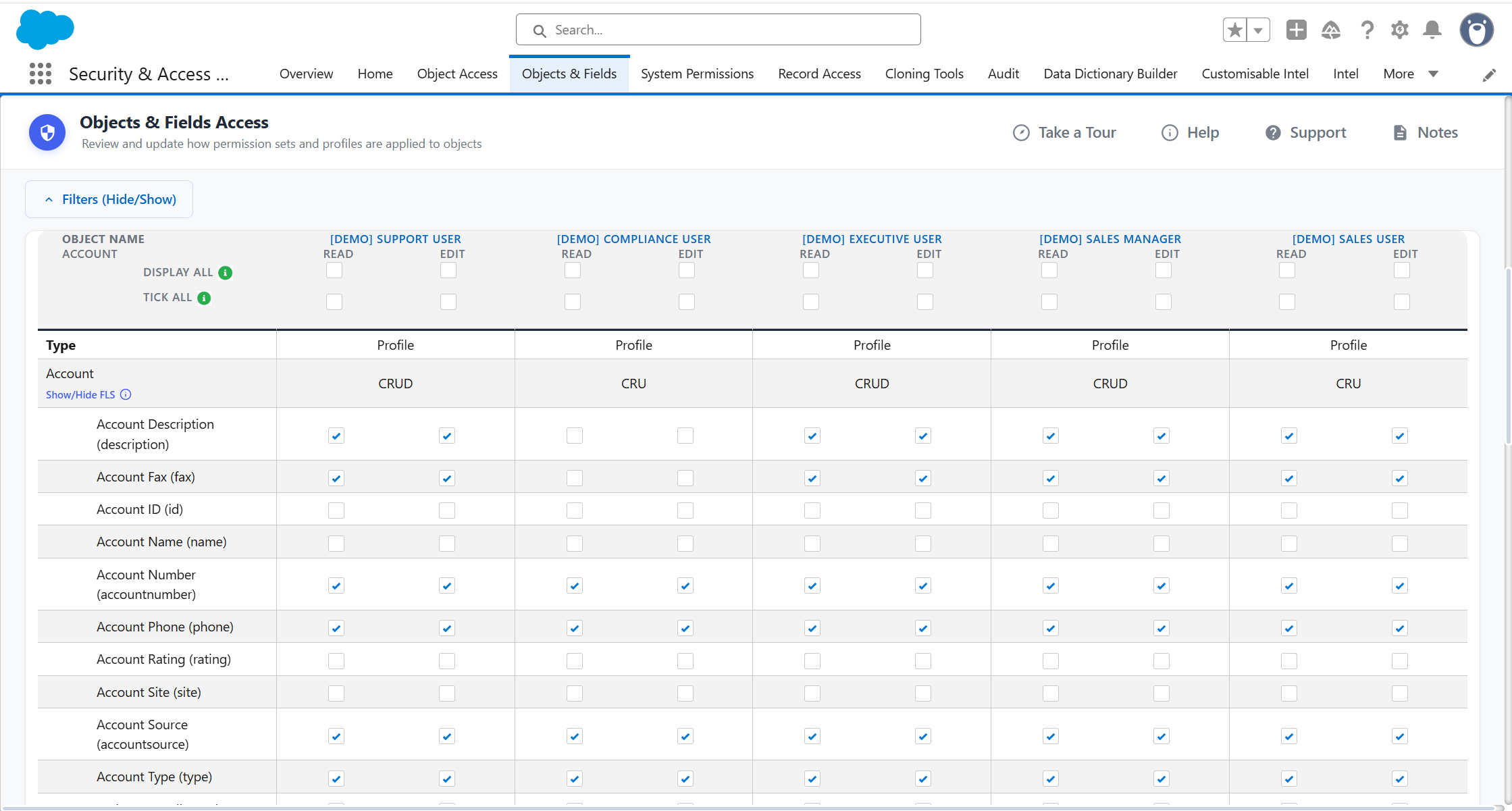
Compare field permissions side by side, then save the selection as a template.
Same fields checked every cycle.
Defining high-riskpermissions
No native way to designate a permission as privileged
Define your own privileged permissions, then run targeted exports.
See exactly who holds them.
Producing audit evidence
Manual exports from multiple areas, reconciled outside Salesforce
Reusable export templates run the same structure every time.
Stakeholder-ready output, every review.
Finding unusedaccess components
No consolidated view of unused profiles, permission sets, roles, or groups
Home tab lists unused components with last review dates.
Clean-up priorities before the review starts.
Eight ways to do what setup can't
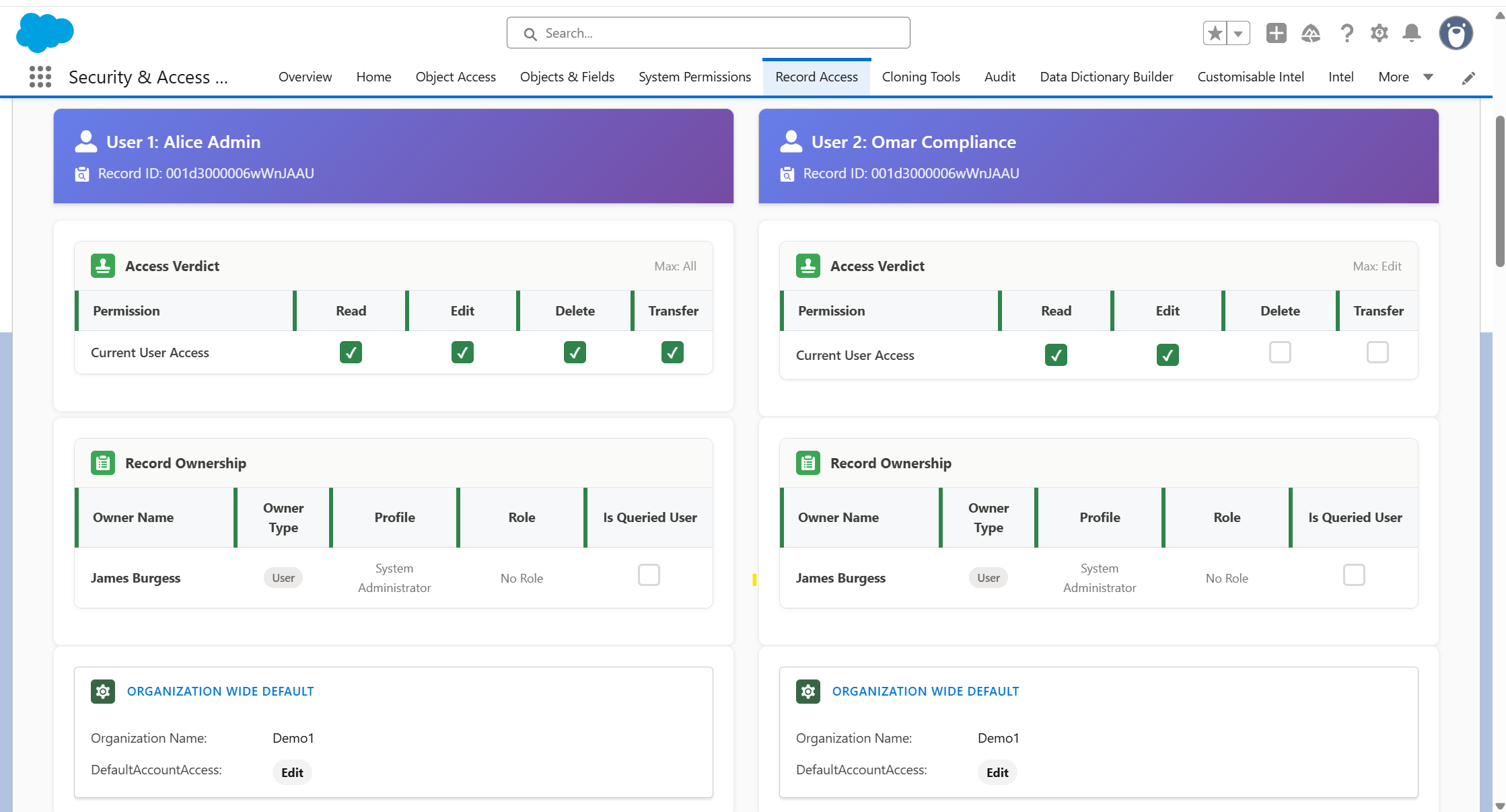
Compare two users side by side to understand why one can access a Salesforce record while another cannot. PMP brings the relevant access factors together in one view, making it much easier to identify differences in permissions, roles, sharing and other access settings without tracing each user separately through Setup.
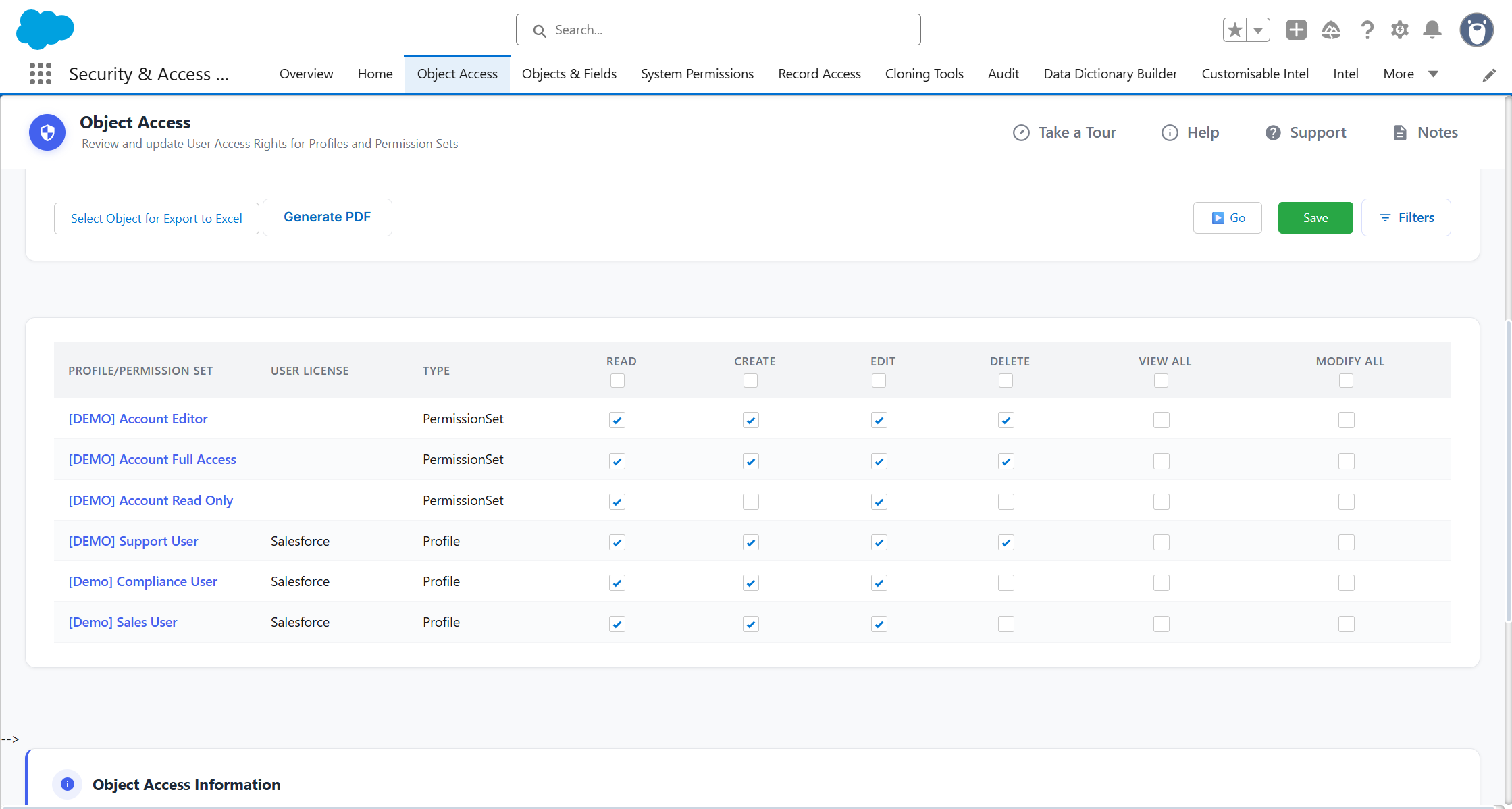
Review object permissions across multiple Profiles and Permission Sets in one central grid. Compare access side by side, make changes across multiple assignments at once and apply updates without opening each Profile or Permission Set individually in Salesforce Setup.
Review field-level security across Profiles and Permission Sets side by side. Quickly compare who has access to individual fields, make changes from the same view and save selections as reusable templates for future reviews.
See System Permissions across multiple Profiles and Permission Sets in one matrix instead of reviewing each assignment separately. Quickly identify where powerful permissions are granted and make permission reviews easier to complete across the org.
Define the permissions your organisation considers privileged or high risk, then focus your reviews specifically on them. Run targeted exports to identify exactly which users and assignments hold those permissions, making high-risk access easier to monitor and evidence.
Create reusable export templates for recurring permission reviews and audits. Select the information you need once, then reproduce the same structured output each review cycle instead of rebuilding evidence manually from multiple areas of Salesforce.
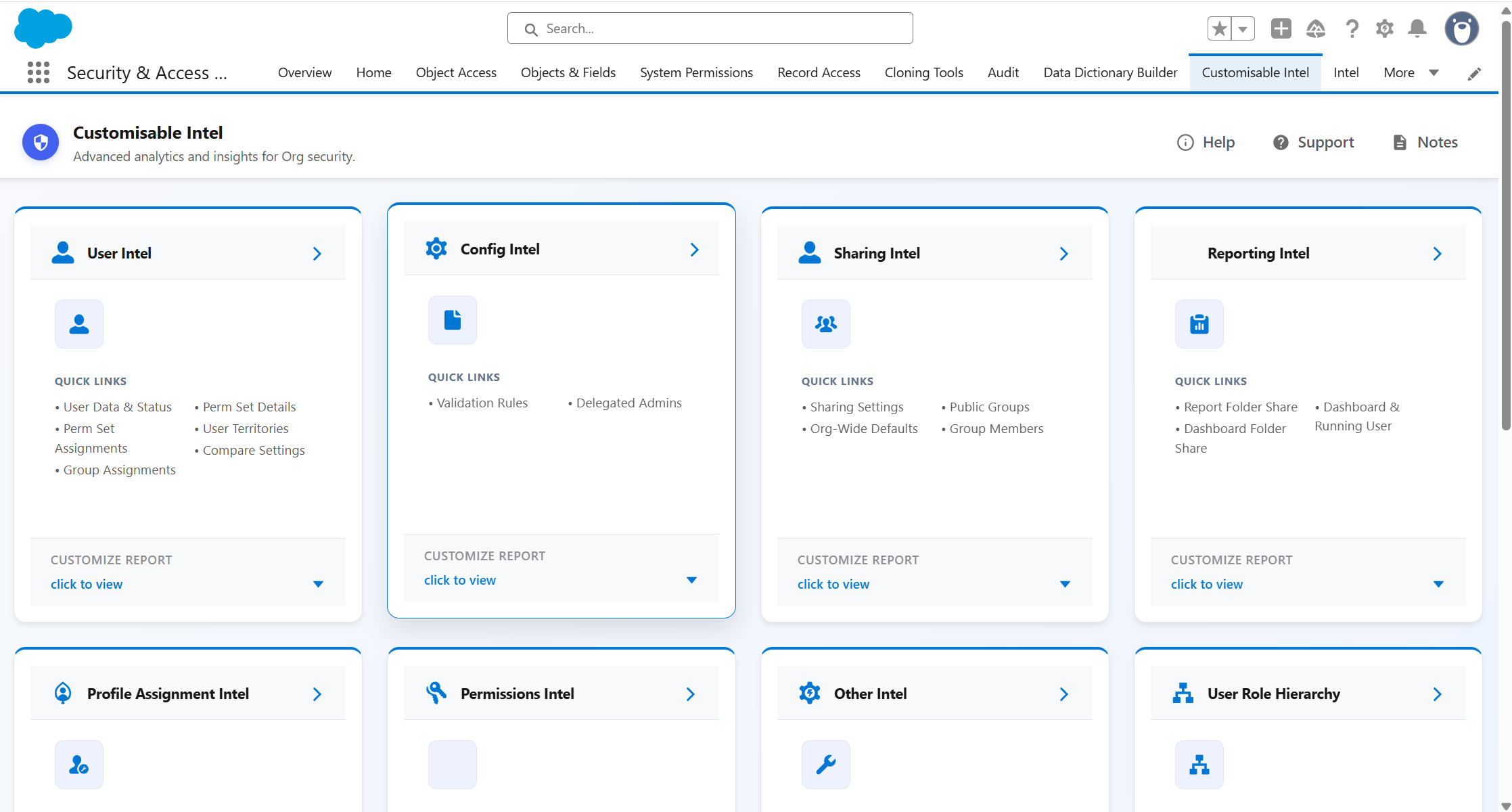
Build custom Intel reports across key areas of your Salesforce org, including users, configuration, sharing, reporting, profile assignments, permissions and role hierarchy. Choose the information you want to investigate and create focused reports without having to piece the data together manually from different areas of Setup.
Get an at-a-glance view of access components that may need attention before a permissions review begins. Surface unused Profiles, Permission Sets, Roles and Groups alongside last review information, helping admins identify clean-up priorities and areas that are overdue for review
- View and compare object, field, and system permissions across Profiles, Permission Sets, and Permission Set Groups in a single matrix view
- Apply bulk permission changes across multiple Profiles and Permission Sets in one action
- Log every change on save and revert to a previous logged state if needed
- Export permissions to Excel for stakeholder review and documentation
- Investigate why a user can or cannot access a specific record: paste a Record ID and get a clear breakdown of the access mechanisms involved
- Compare two users against the same record side by side
- Report on fields as they change
- Review Profile, Permission Set, Role, Record Sharing, and Group Sharing settings side by side
- See applicable Record Type and
Territory Management settings within access reviews - Review Profile access to Page Layouts across Objects
- Review permissions within Permission
- Set Groups at the Permission Set level
- Save tab selections as reusable templates for consistent recurring reviews
- Surface unused access components and last review dates from the Home tab
- Run targeted, read-only security and configuration checks using Lightning Intel, with reusable filter templates and CSV export
Want to understand how it improves your workflow? Book a tailored demo
30 min walkthrough. No prep needed
Define Once. Run consistently.

1
Select your scope
Choose the range ofprofiles, permission sets,users, or objects youwant to review.

2
Review with clarity
View permissions acrossprofiles and permission setsin one matrix, withoutmultiple Setup screens.

3
Act with confidence
Apply bulk updates withchange logging built in.Revert to any previous stateif needed.
4
Export and evidence
Save your scopeas a template for next time.Export consistent evidenceevery review cycle.
Permissions Manager Pro is one part of a broader governance picture
Permissions Manager Pro is where most teams start.The suite is where they end up.
Part of the Security + Access Manager Suite
Eight apps. One workflow covering permissions, users, audits, reports, and metadata.Permissions Manager Pro can be installed as a standalone app or as part of the full suite.
Ready to stop chasing permissions across Setup?
In a tailored demo we'll show you:
• How PMP handles the most time-consuming access reviews in your org• How bulk changes work in practice, with the audit trail Setup doesn't give you• How it connects to the wider suite if your governance needs grow
30 minutes. No prep needed. No credit card required.