










Field questions keep coming.
Every new project adds fields. Few get described.So the questions land on you. Users guess what fields mean. Errors surface later.Salesforce lets you edit descriptions in Setup, but checking coverage means openingobjects one at a time, with no view of what's documented and what isn't.
Completion charts reveal gaps before users ask.
See what is documented, then close the gaps.
One workspace for permission reviews, bulk updates, and audit exports.
Setup stores field descriptions.Data Dictionary Builder clarifies them.
Clearer definitions. Safer handling. Audit-ready records.


Dictionarycompletion charts
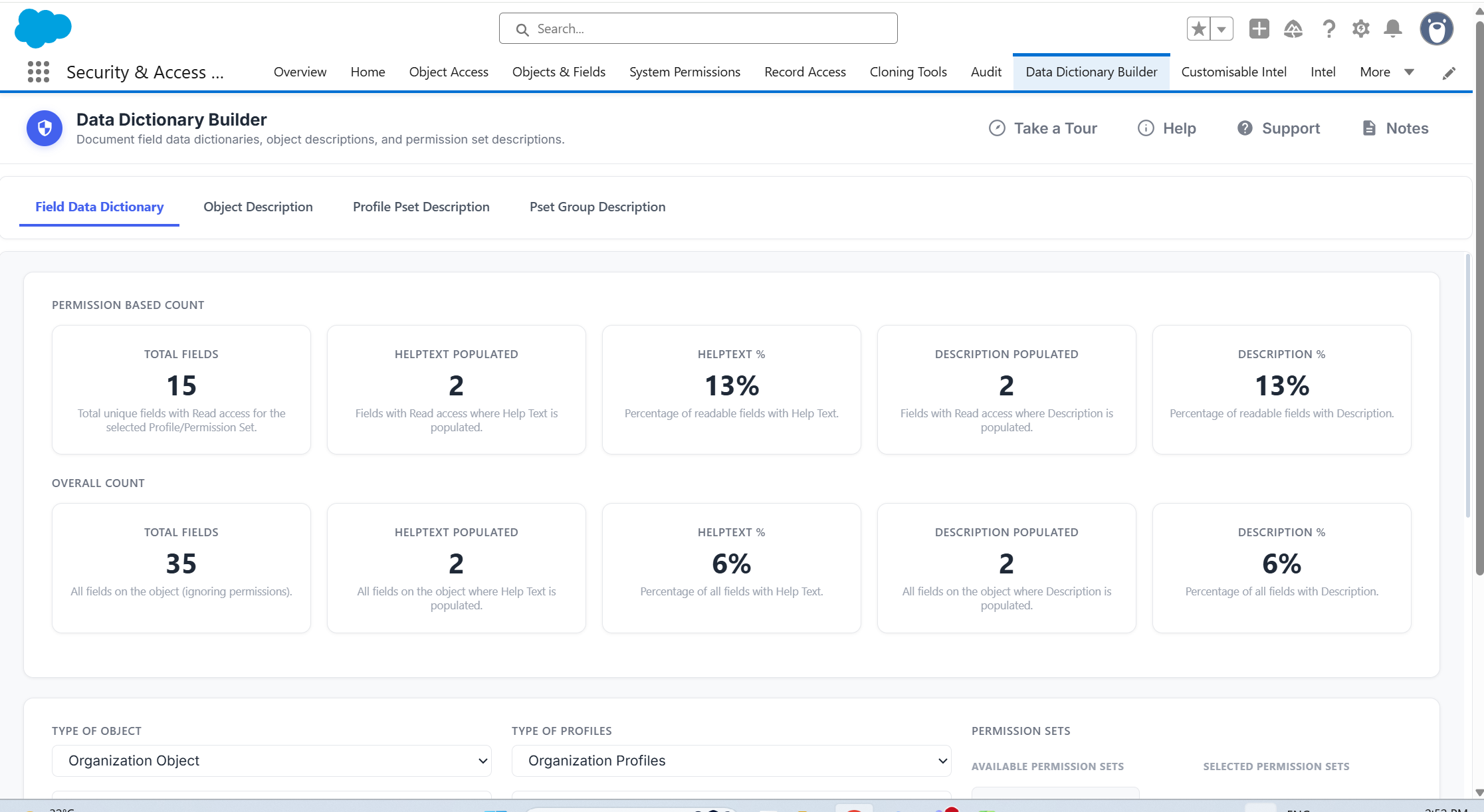
See description and help text coverage by object and by access scope, so you know exactly where the gaps are.
Bulk-edit descriptionsand help text
Update field descriptions and help text together in one pass, live in your org.

Sensitive dataclassification
Tag fields for sensitivity, usage, ownership and compliance, then report on them.
Broader metadata documentation
Review object, profile, permission set and permission set group descriptions in one workflow.
Unclear fields create questions. Sensitive fields create risk.Data Dictionary Builder defines and classifies them.
Questions, lookups & corrections
One dictionary review
with Data Dictionary Builder & User
"Data Dictionary Builder showed us where definitions were missing, then made updates easy to share. Users get clearer answers in Salesforce, and Admins get fewer questions."


Stephanie Poorman

Setup wasn’t built to maintain a data dictionary.
Here is where that gap shows up across common metadata documentation tasks.
Salesforce Setup
With Data Dictionary Builder
Reviewingdescriptioncoverage
Open each object and field to checkwhat is described

Completion charts show description and help text coverage across selected objects and access scopes
Updatingdescriptionsand help text
Edit each fieldseparately in Setup

Review fields in one report and update descriptions and help text together, with live save
Classifyingsensitive data
Note sensitive fields separately, outside Setup
Tag sensitivity, usage, ownership and compliance against each field
Documentingobjects
Edit object descriptions individually
Review and update object descriptions across selected objects in one pass
Documenting profiles& permission sets
No consolidated view of which are described
Review and edit profile, permission set and permission set group descriptions in the same place
Finding the fieldsin scope
Scroll the object's field list
Search and filter to the fields you need to review
Reporting against data protection rules
No native reporting on sensitive-field classification
Every save generates a log entry.
Revert to any previous state.
Keeping a record for audit
Manual collation outside Salesforce
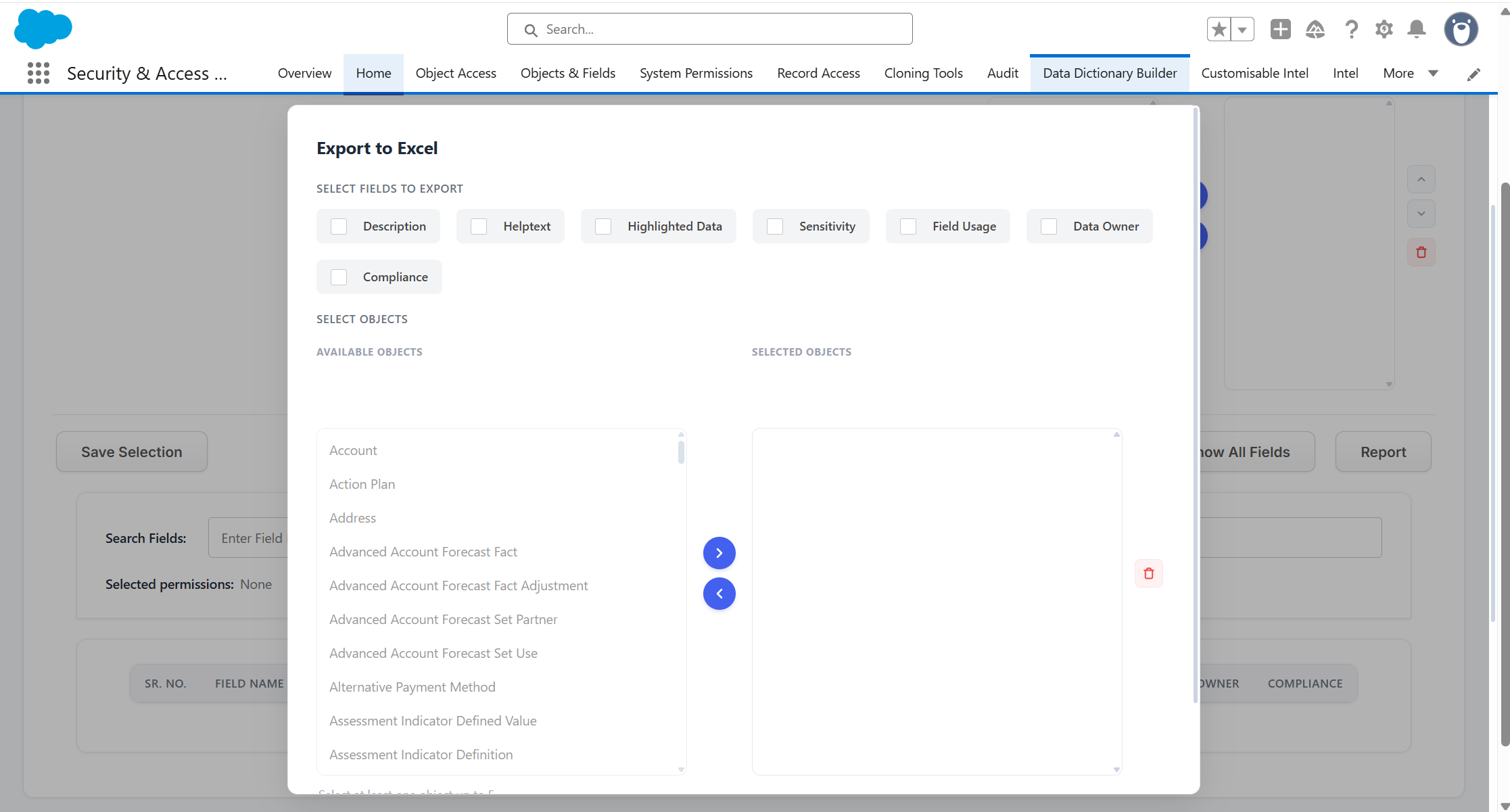
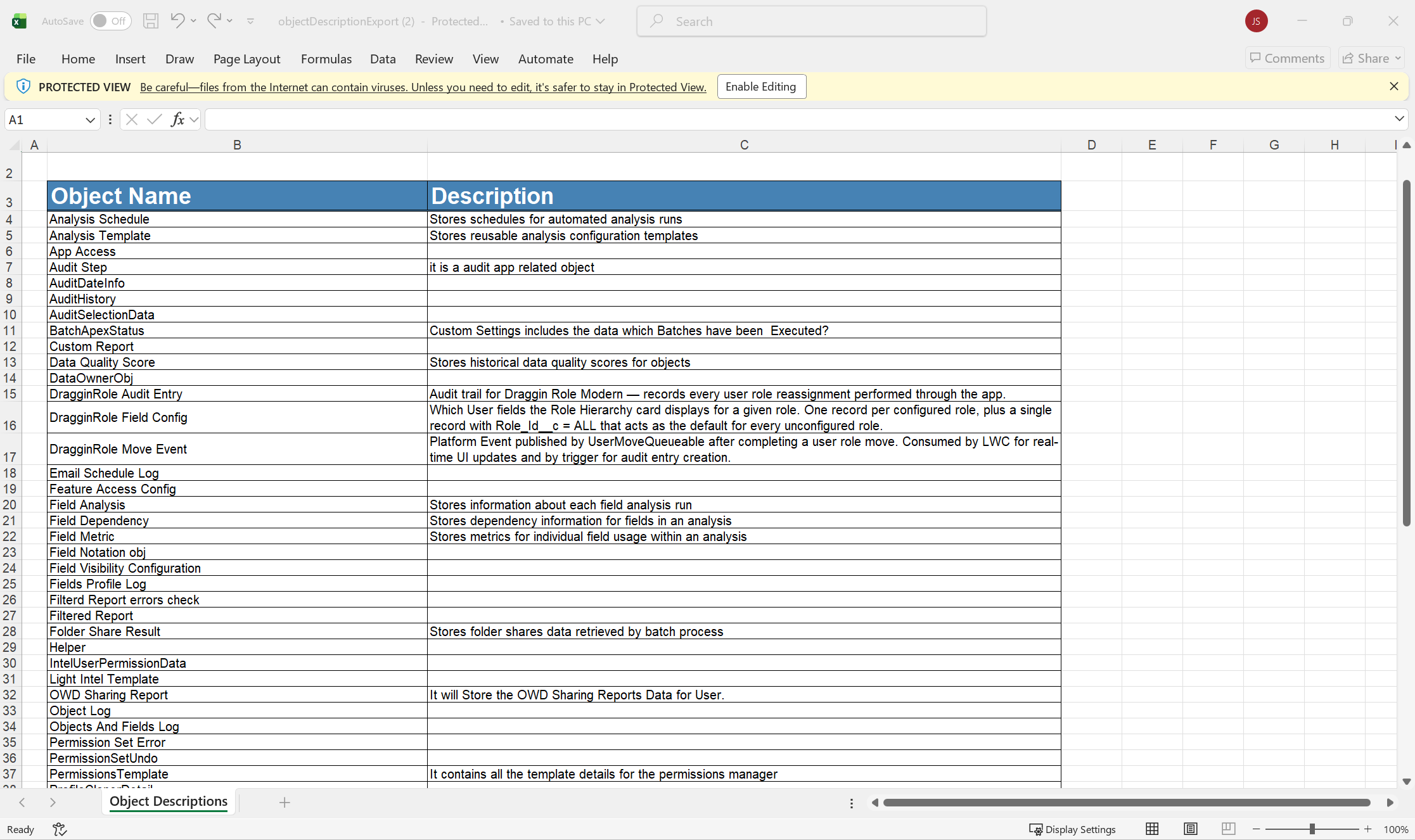
Export dictionary records to Excel for audit and stakeholder review
Giving users the definitions
Users ask an admin, or open a separate document
Data Dictionary User shows definitions inside Salesforce, limited to what each user's permissions allow
Nine ways to do what setup can't
See how complete your Salesforce field documentation is across selected objects. Completion charts highlight where descriptions or help text are missing, making it easy to identify which areas of the org need attention first.
Review field documentation from one central workspace instead of opening individual objects and fields in Setup. See existing descriptions and help text together, identify gaps and update your data dictionary more efficiently.
Search and filter your data dictionary to quickly find the fields you need. Narrow large objects down to the relevant fields instead of scrolling through long field lists in Salesforce Setup.
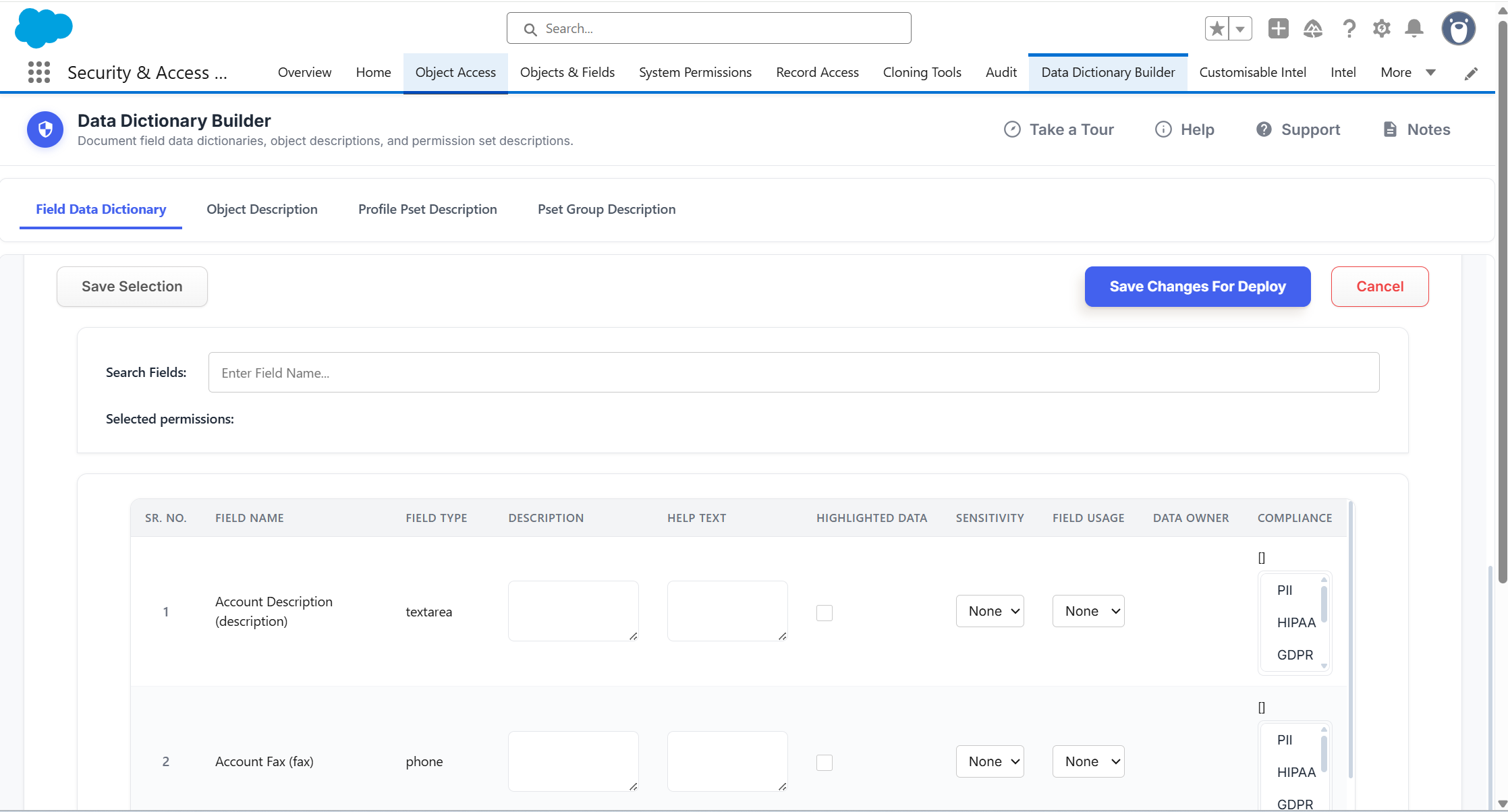
Update field descriptions and help text directly from the Data Dictionary Builder interface. Make multiple documentation changes from one screen and deploy those updates back into Salesforce without editing every field individually.
Classify fields according to how the data is used and protected. Record sensitivity, usage, compliance and other relevant information alongside each field so sensitive data can be identified and governed consistently.
Identify which Salesforce fields fall under specific compliance or data-protection requirements. Use the classifications recorded against your fields to produce a clearer view of sensitive information across the org.
Review object descriptions alongside your wider data dictionary. Identify objects with missing or outdated documentation and update their descriptions without repeatedly navigating through Salesforce Setup.
Review and maintain documentation for Profiles, Permission Sets and Permission Set Groups as part of the same data dictionary process. Create clearer definitions around the access structures used throughout your Salesforce org.
Export your data dictionary records to Excel for offline review, audit evidence or stakeholder sharing. Give teams a structured record of field definitions, classifications and other documented metadata without manually compiling it outside Salesforce.
- Profile & Permission-Set Dictionaries. Grant teams easy access to definitions while controlling who can view and edit sensitive information.
- Centralized Field Documentation. Update descriptions and help text in one place, streamlining data governance across your org.
- Sensitive Data Tracking. Identify and classify fields subject to data-protection regulations (GDPR, HIPAA, etc.) and quickly produce compliance reports.
- Dashboard view analyses how well the object field descriptions are completed.
- View and create Profile and Permission Set specific dictionaries for object fields in the org.
- Search for specific fields to review.
- Update field description and help text on one screen, live within the org.
- Track and classify Sensitive Data easily.
- Produce a compliance report showing which fields are subject to specific
data protection. - Give users access to dictionaries with Data Dictionary Viewer.
- Users can reference field descriptions and help texts to assist them with precise data input.
- Users can only view within their permissions
Want field documentation your org can trust? Book a tailored demo
30 min walkthrough. No prep needed
Find gaps. Clarify fields. Share answers.

1
Review coverage
Use completion charts to see which objects and fields still need descriptions or help text.
2
Update the metadata
Search fields, edit descriptions and help text, update object, profile and permission set descriptions, then save.

3
Classify and export
Tag sensitive fields, apply compliance categories, and export records to Excel for audits and stakeholders.

4
Publish to users
Make the right definitions available to the right users with Data Dictionary User.
Then put those definitions where users work.
Data Dictionary Builder is the admin workflow. Data Dictionary User is the read-only layer that brings trusted definitions to the people entering the data, within their permissions, inside Salesforce.
Users should not have to ask what a field means.When the definition lives in a document, a spreadsheet or someone's head, work slows down and answers drift. Data Dictionary User gives them role-based access to the definitions you built in Data Dictionary Builder, inside Salesforce.
Five ways users get the answer
Give users access to a read-only data dictionary based on their existing Salesforce permissions. Users only see definitions for the areas of Salesforce they are permitted to access, keeping the dictionary relevant to their role without exposing unnecessary information.
Give users access to field descriptions and help text directly inside Salesforce. Instead of searching through separate documents or asking an Admin what a field means, users can quickly reference the guidance they need while working.
Search for the field you need and quickly find its description and help text. Users can locate the right definition without scrolling through large dictionaries or relying on external documentation.
Give users clear guidance around fields containing sensitive or regulated information. Admin-maintained descriptions and help text can explain how fields should be used and handled, helping reinforce consistent data practices across the organisation.
Keep users working from the latest definitions instead of outdated documents or spreadsheets. When Admins maintain field descriptions and help text in Salesforce, Data Dictionary User gives users access to the current information from the same live data dictionary.
Fewer field questions. Faster onboarding.Data Dictionary User gives definitions your users can trust.
Data Dictionary Builder is one part of a broader governance picture
Data Dictionary Builder keeps your metadata defined and documented.The suite covers the permissions, users, and audits around it.
Part of the Security + Access Manager Suite
Eight apps. One workflow covering permissions, users, audits, reports, and metadata.Data Dictionary Builder can be installed as a standalone app or as part of the full suite.
Ready to make your fields self-explanatory?
In a tailored demo we'll show you:
• How completion charts reveal gaps before users ask• How to update descriptions, classify sensitive fields, and export audit-ready records• How Data Dictionary User helps cut field questions at the source
30 minutes. No prep needed. No credit card required.