












Profile migration is always tomorrow's job.
Profiles are on the way out. Most admins know it. The tools to do it stop short.No history of what's been done. No quick way to repeat the work. No fast lane for onboarding either. So migration sits on the backlog, and the backlog grows.
Three-click cloning turns the backlog around.
Four access workflows. One workspace.
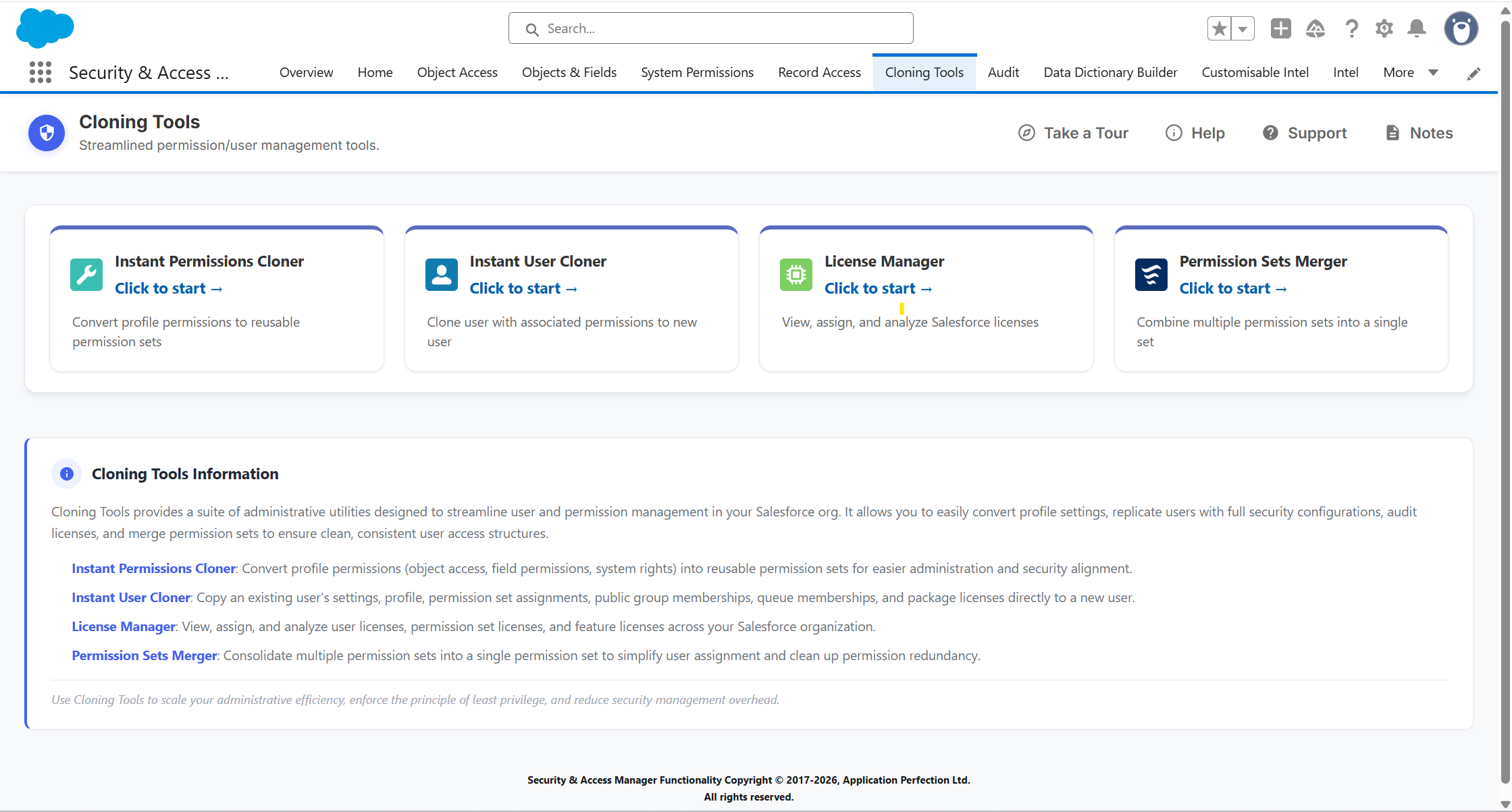
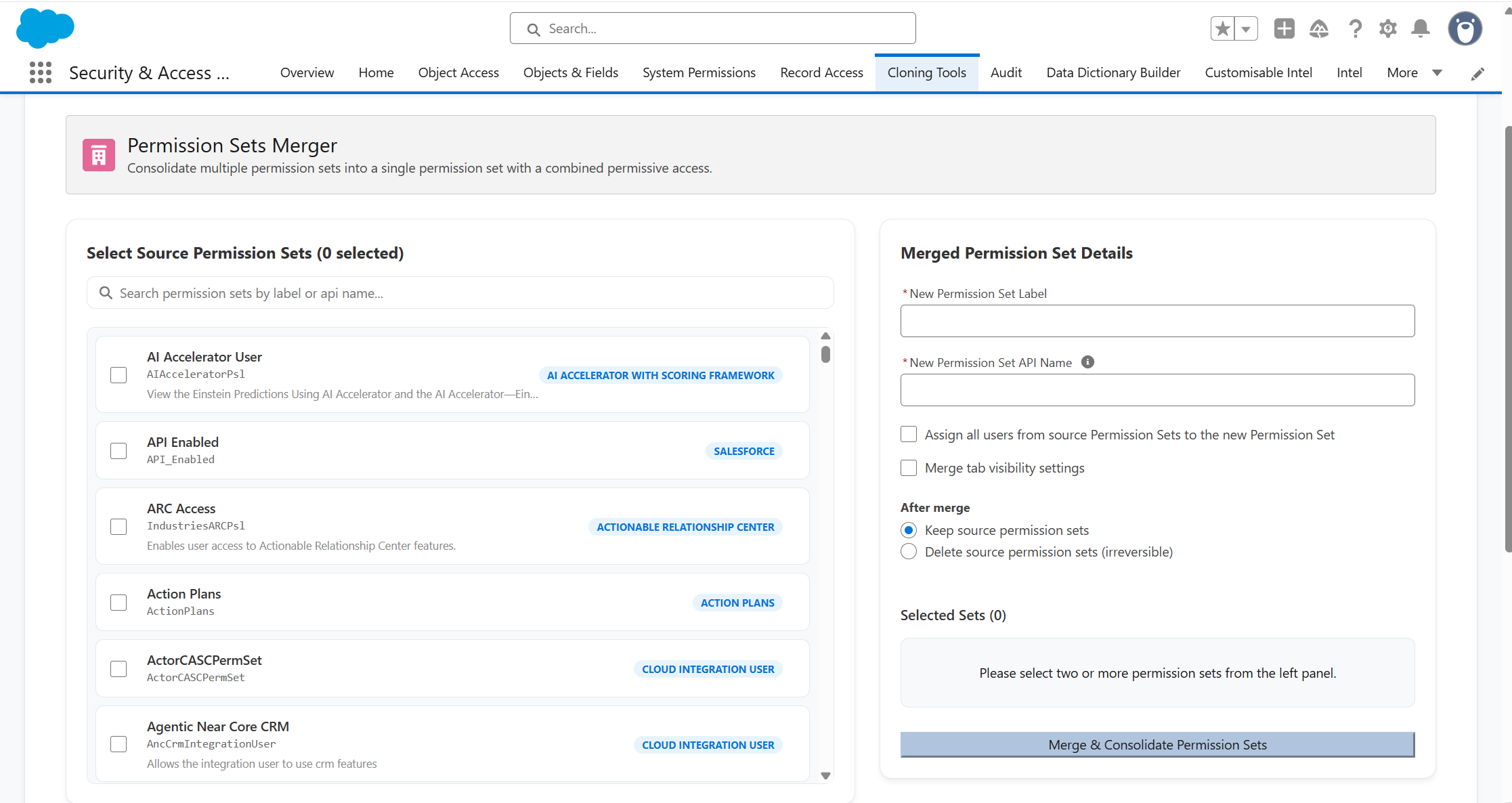
Clone profiles to permission sets, replicate user access, review licence utilisation,and merge overlapping permission sets from one screen.
Setup creates profiles.Instant Permissions Cloner replicates them.
Faster migration. Accurate clones. Logged every time.


Three-clickprofile cloning
Three clicks. A new permission setin seconds. No Tooling API setup.

Accurate replication,every time
Object access, fields, & licence types cloned exactly.

Migration historythat holds
Every clone tracked, withprofile and set names.

User-to-usercloning
Copy a user's settings and permissions to another.
Deferred migration is permissions debt.Instant Permissions Cloner clears the backlog.
Manual rebuild
Three-click clone
with Instant Permissions Cloner
"The ability to clone a profile over to a permission set — everyone has some legacy profiles you have always wanted to clean up but dreaded the effort you'd have to put into doing so, and this feature is so helpful in reducing the amount of time it takes to make that switch."


Kirk Young

Setup wasn't built for access restructuring.
Here’s where that gap shows up across eight common access management tasks.
Salesforce Setup
With Instant Permissions Cloner
Moving profile access into a permission set
Recreate permissions manually across multiple Setup screens and verify nothing was missed

Select a profile and clone supported permissions into a new permission set in one action
Reviewing what was cloned
Manually compare the profile and new permission set to check what transferred

Post-clone summary shows what was copied and flags any exceptions
Creating a new user with the same access
Create the user, then manually recreate their profile, role, permissions and settings

Use an existing user as a template and replicate supported access in one step
Copying access between existing users
Compare two users and recreate permissions and settings one item at a time
Select source and target user and replicate supported access, preserving the target's existing permissions
Tracking profile cloning history
No dedicated record of which profiles have been cloned
Clone history shows source profile, resulting permission set and date, with Quick Assign for reuse
Understanding licence utilisation
Review capacity and assignments across separate Setup screens
User, permission set and package licence utilisation in one view with capacity and consumption detail
Finding reclaimable licences
Cross-reference licence assignments with login activity manually
Surface users with no login for 90 days or no login ever, exportable to CSV
Consolidating overlapping permission sets
Compare sets manually, build a replacement, reassign users and clean up separately
Merge compatible sets into one with pre-merge preview, optional user migration and source set removal
Ten ways Cloner goes further
Clone all supported permissions from a Salesforce Profile into a new Permission Set in one guided workflow, while leaving the original Profile unchanged.
Review the permissions copied into the new Permission Set and surface any access Salesforce could not transfer, with details of cloning exceptions.
Search Salesforce users and assign a newly created Permission Set to multiple users directly after cloning, with licence compatibility checks during assignment.
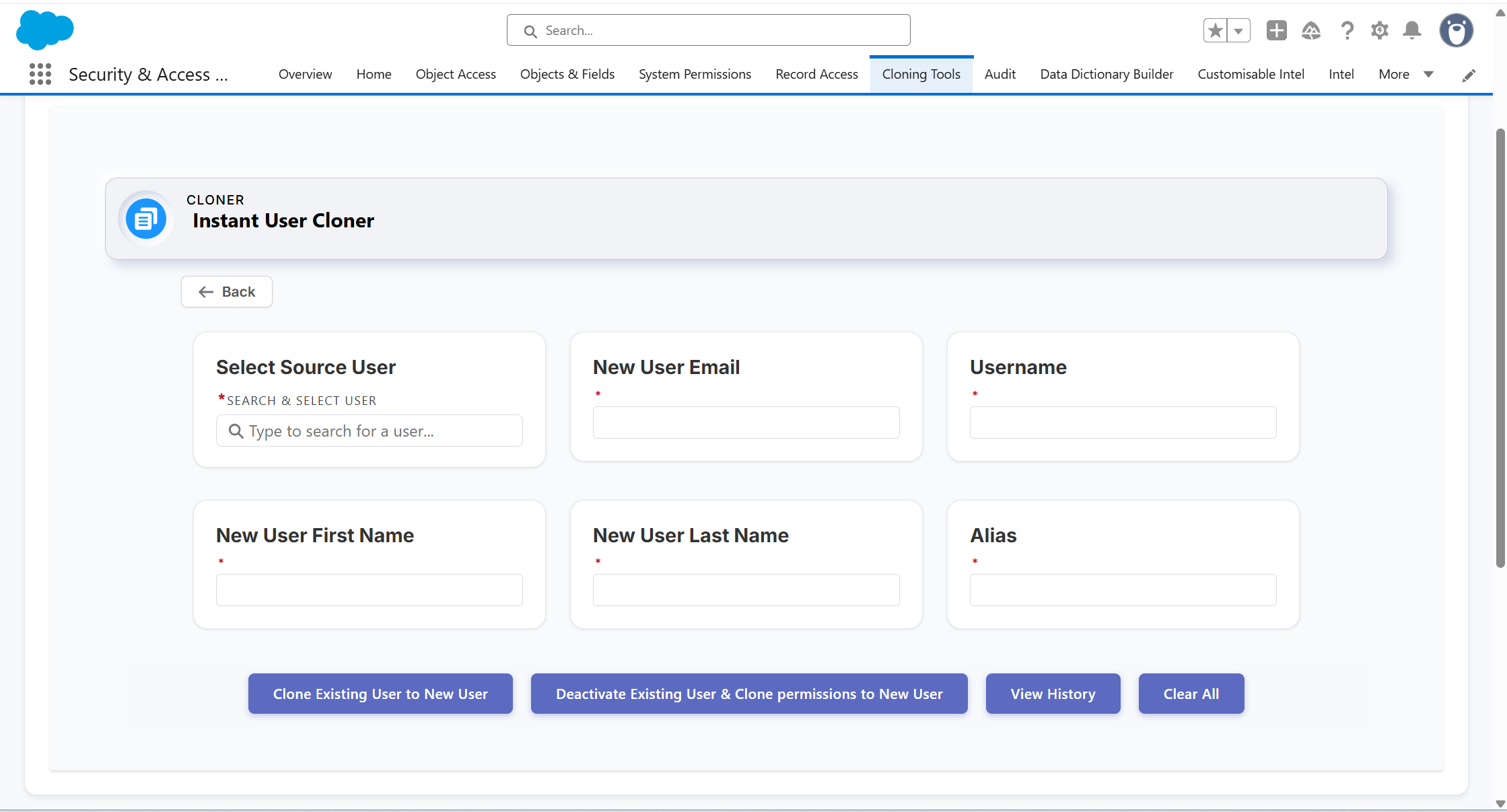
Use an existing Salesforce user as a template and create a new user with their supported permissions, access assignments, Profile, Role and user settings replicated.
Create a replacement user using an existing user’s supported access and configuration, with the option to deactivate the original account through a confirmation-controlled workflow.
Select a source and target user and copy supported permissions, memberships and settings without manually rebuilding the target user’s access.
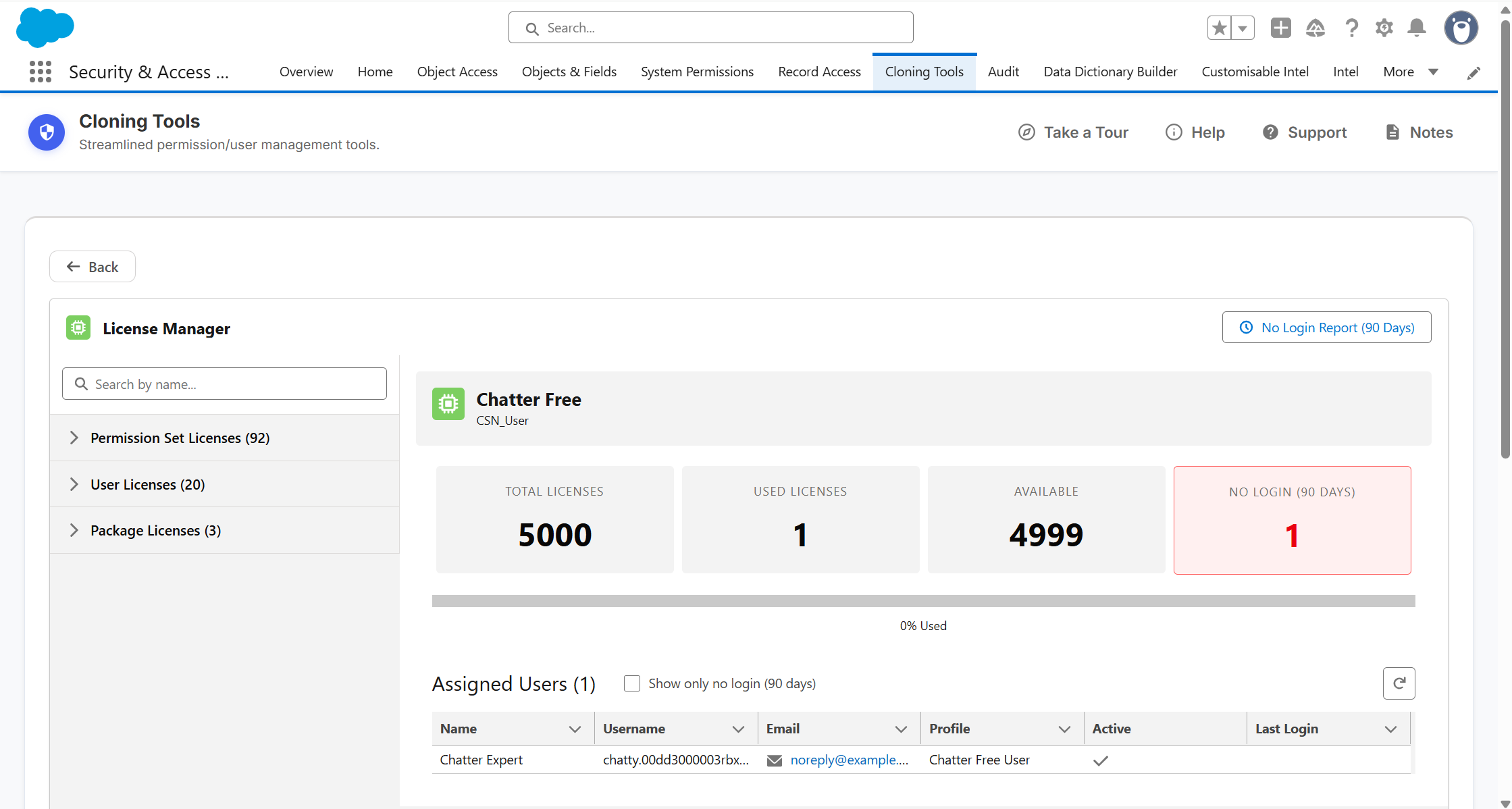
View User, Permission Set and Package License utilisation in one place, see who is consuming each licence, and bulk assign or revoke supported licence types.
Find active users who have not logged in for 90 days, identify accounts that have never logged in and export the results to CSV for licence reviews.
Combine all supported access from multiple compatible Permission Sets into a single new set, with options to migrate assigned users and keep or remove the originals.
Preview estimated object, field, setup and system access before merging and highlight privileged permissions contained within the source Permission Sets.
- View and compare object, field, and system permissions across Profiles, Permission Sets, and Permission Set Groups in a single matrix view
- Apply bulk permission changes across multiple Profiles and Permission Sets in one action
- Log every change on save and revert to a previous logged state if needed
- Export permissions to Excel for stakeholder review and documentation
- Investigate why a user can or cannot access a specific record: paste a Record ID and get a clear breakdown of the access mechanisms involved
- Compare two users against the same record side by side
- Report on fields as they change
- Review Profile, Permission Set, Role, Record Sharing, and Group Sharing settings side by side
- See applicable Record Type and
Territory Management settings within access reviews - Review Profile access to Page Layouts across Objects
- Review permissions within Permission
- Set Groups at the Permission Set level
- Save tab selections as reusable templates for consistent recurring reviews
- Surface unused access components and last review dates from the Home tab
- Run targeted, read-only security and configuration checks using Lightning Intel, with reusable filter templates and CSV export
Want to understand how it improves your workflow? Book a tailored demo
30 min walkthrough. No prep needed
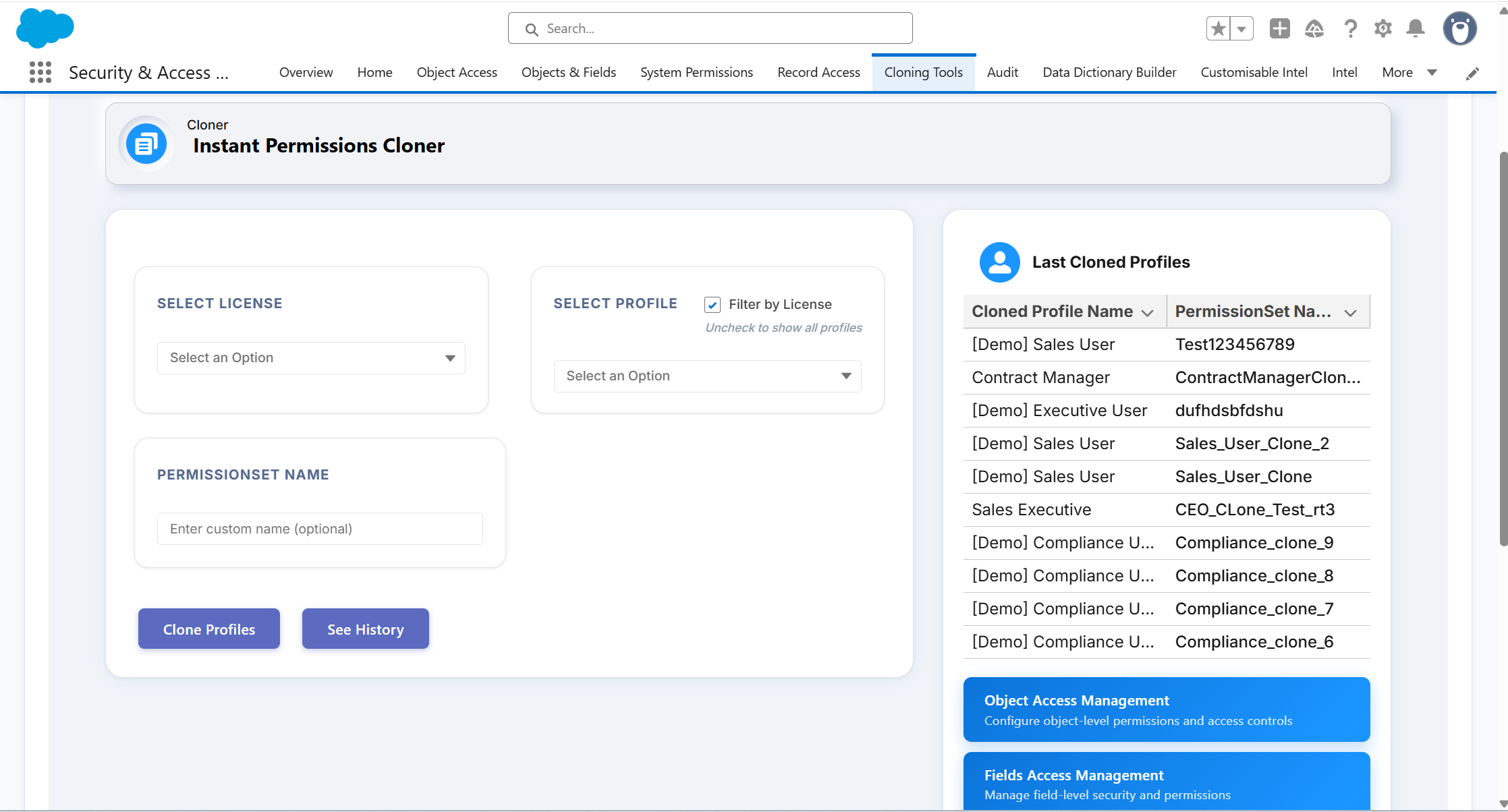
Pick once. Clone repeatedly.

1
Pick the profile
Open Cloner. Select the Salesforce licence type and the profile you want to migrate.

2
Name the permission set
Enter your naming convention. The new permission set will use this name in the org.

3
Clone in one action
Click Clone Profiles. The new permission set is created with the source profile's object access and field-level security replicated.

4
Reference the history
See every clone performed in the migration history. Review what's been done and pick the next profile.
Instant Permissions Cloner is one part of a broader governance picture
Instant Permissions Cloner moves you off profiles.The Suite manages access, users, audits, and reports across the model you're moving to.
Part of the Security + Access Manager Suite
Eight apps. One workflow covering permissions, users, audits, reports, and metadata.Instant Permissions Cloner can be installed as a standalone app or as part of the full suite.

Ready to take the migration off tomorrow's list?
In a tailored demo we'll show you:
• How to clone a profile into a permission set in three clicks• How object access and field-level security replicate automatically• How the migration history gives you a record of every clone performed
30 minutes. No prep needed. No credit card required.