












Fields build up quietly.
Projects, integrations, and reports keep adding more fields.
Some go unused. Some are barely populated. Some sit on layouts, in reports, or behind dependencies you cannot see quickly.
So cleanup turns into guesswork, delay, and risk.
Field insights removes the guesswork.
See how your fields are actually used.
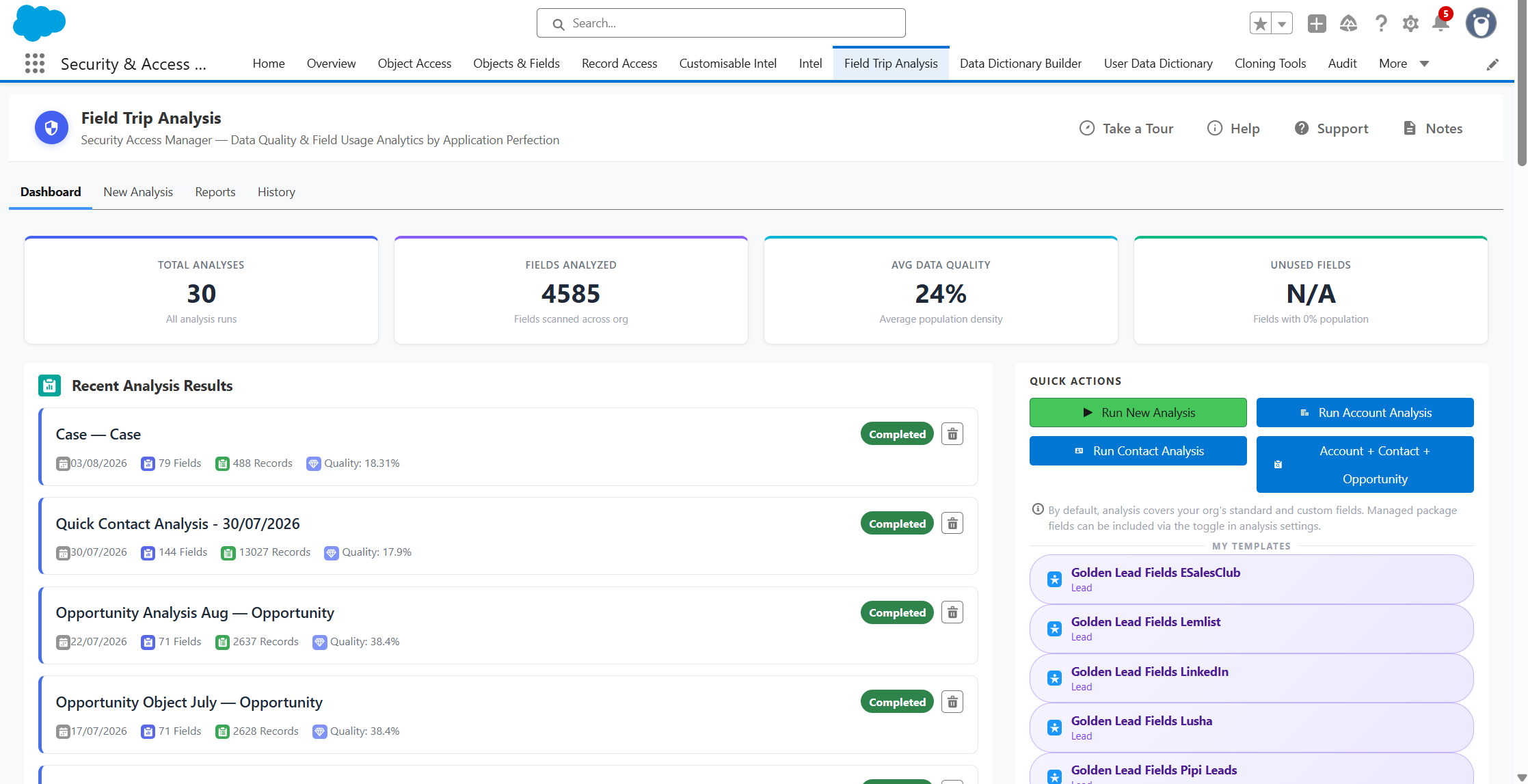
One place for field usage, risk, and recommendations.
Setup lists fields.
Field Trip Analysis evaluates them.
Clearer usage. Safer cleanup. Shareable evidence.


Field usage analysis
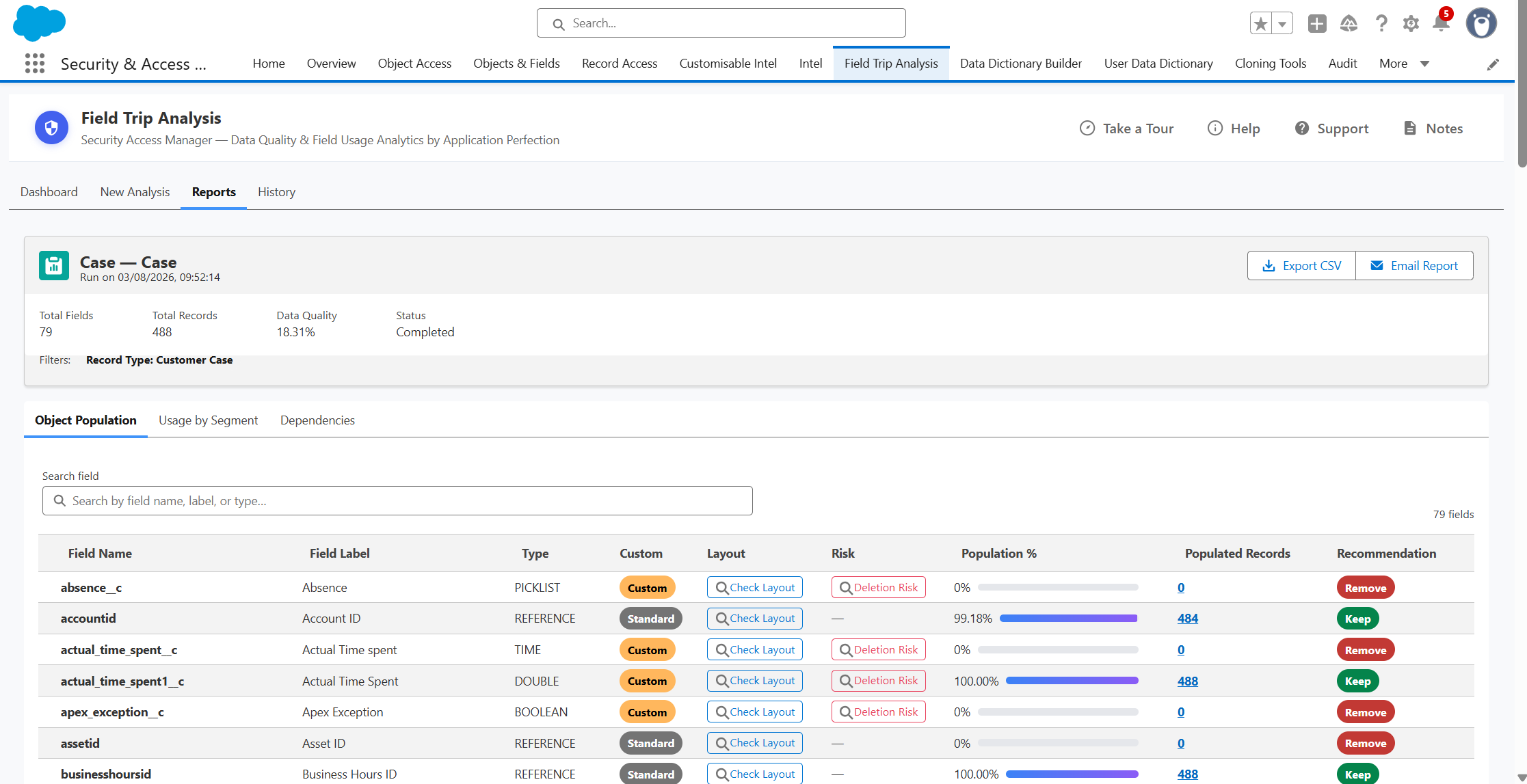
See field population percentages, populated record counts, and automatically generated recommendations for Keep, Review, or Remove.

Layout
visibility insight
Check if fields appear on page layouts and if they're included, missing or hidden.

Dependency and deletion risk
Review warnings and where fields appear in code and reports.

Scheduled analysis
& shareable reports
Schedule recurring runs and share results with stakeholders.
Low population does not always mean low value.
Field Trip Analysis reveals usage, exposure, and cleanup risk.
Hours of manual checking
One field usage review
with Field Trip Analysis
"Field Trip Analysis has been a useful tool for getting a clearer view of field usage in Salesforce. It makes it easier to spot fields that may need cleaning up, understand what is actually being used, and support better documentation across the org. The app is straightforward to use and helps admins dealing with field clutter or technical debt."


Ben Starkie

Setup wasn't built for field cleanup decisions.
Here's where that gap shows up across eight common field review and cleanup tasks.
Salesforce Setup
With Field Trip Analysis
Clean-up
recommendations
No native clean-up recommendation

Automatically generate Keep, Review, or Remove recommendations
Field population
Manually inspect whether fields are populated

See population percentage and populated record counts in one view
Dependency review
Check dependencies through separate tools
or manual investigation

See dependency warnings and where fields are referenced in code and reports
Multi-object review
Work through fields object by object
Analyse fields across one or multiple objects in a single run
Layout visibility
Open each page layout to check whether the field is there
See whether a field is included, missing or hidden across layouts
Field access
exposure
Trace field-level security through each profile and permission set
See which profiles can access each field alongside its usage
Repeat analysis
Rebuild the filters and selections each cycle
Save the configuration as a template and reuse it
Stakeholder reporting
Manual export and formatting after every run
Schedule recurring runs and email results to stakeholders
Eight ways to do what setup can't
See how consistently each field is populated across selected Salesforce objects. Quickly identify fields that are heavily used, rarely populated or completely empty, giving admins clearer evidence when deciding what should be retained, investigated or considered for cleanup.
Automated recommendations help teams focus their attention on likely cleanup candidates while keeping the final decision with Salesforce admins and relevant stakeholders.
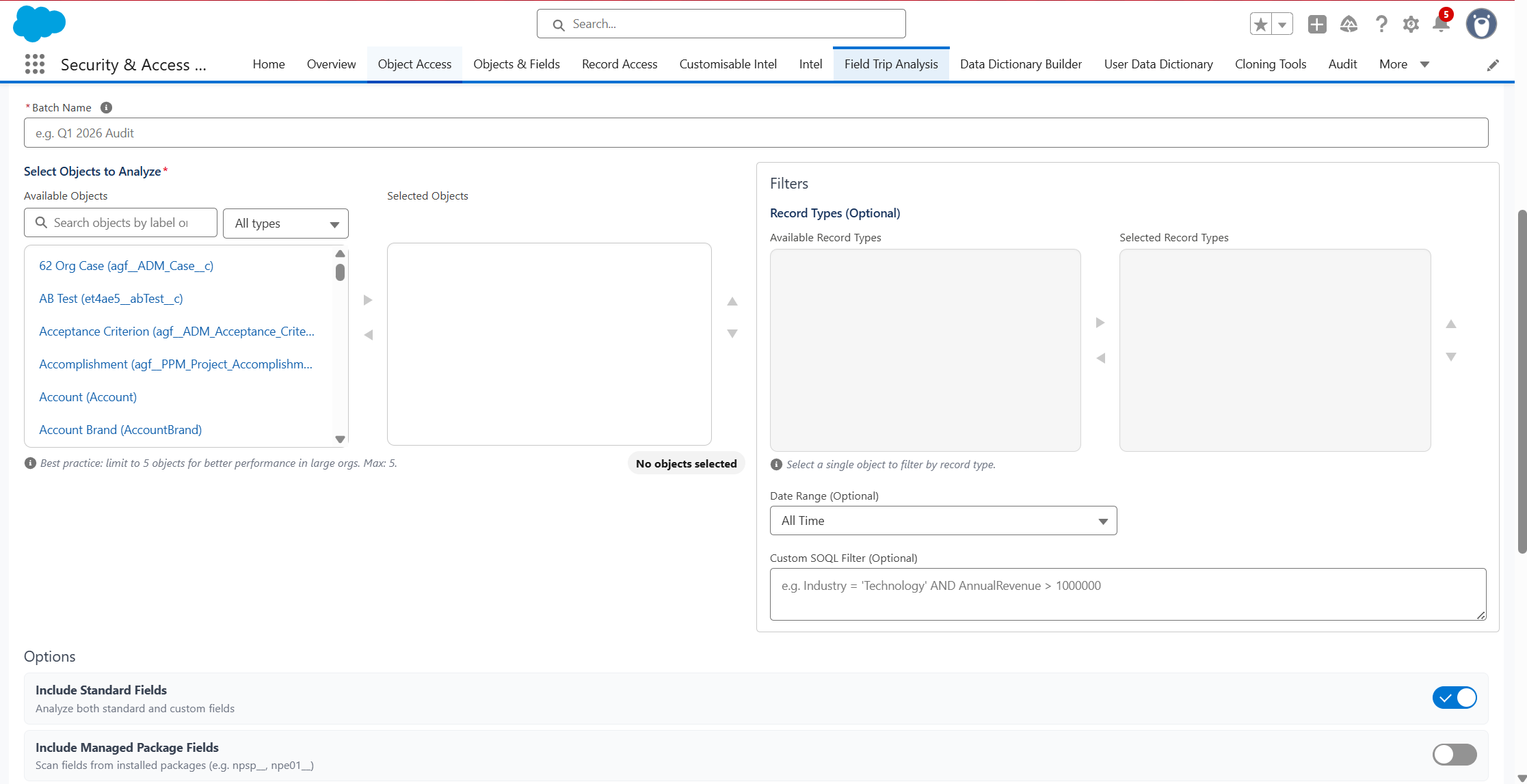
Analyse a single object or multiple objects within the same run. This makes it easier to review larger areas of the Salesforce data model consistently, while background processing supports more extensive analyses.
See where fields are included across page layouts and identify potential gaps or inconsistencies. This helps admins understand whether fields appear in the right places before changing, documenting or retiring them.
Review which selected profiles and permission sets can access individual fields. This adds important security context to field analysis, helping teams identify unnecessary exposure, confirm intended access and support stronger field governance.
See where fields are referenced across page layouts, reports, dashboards and Apex. Combining dependency information with field-population data gives teams a clearer picture of the potential impact before changing or retiring a field.
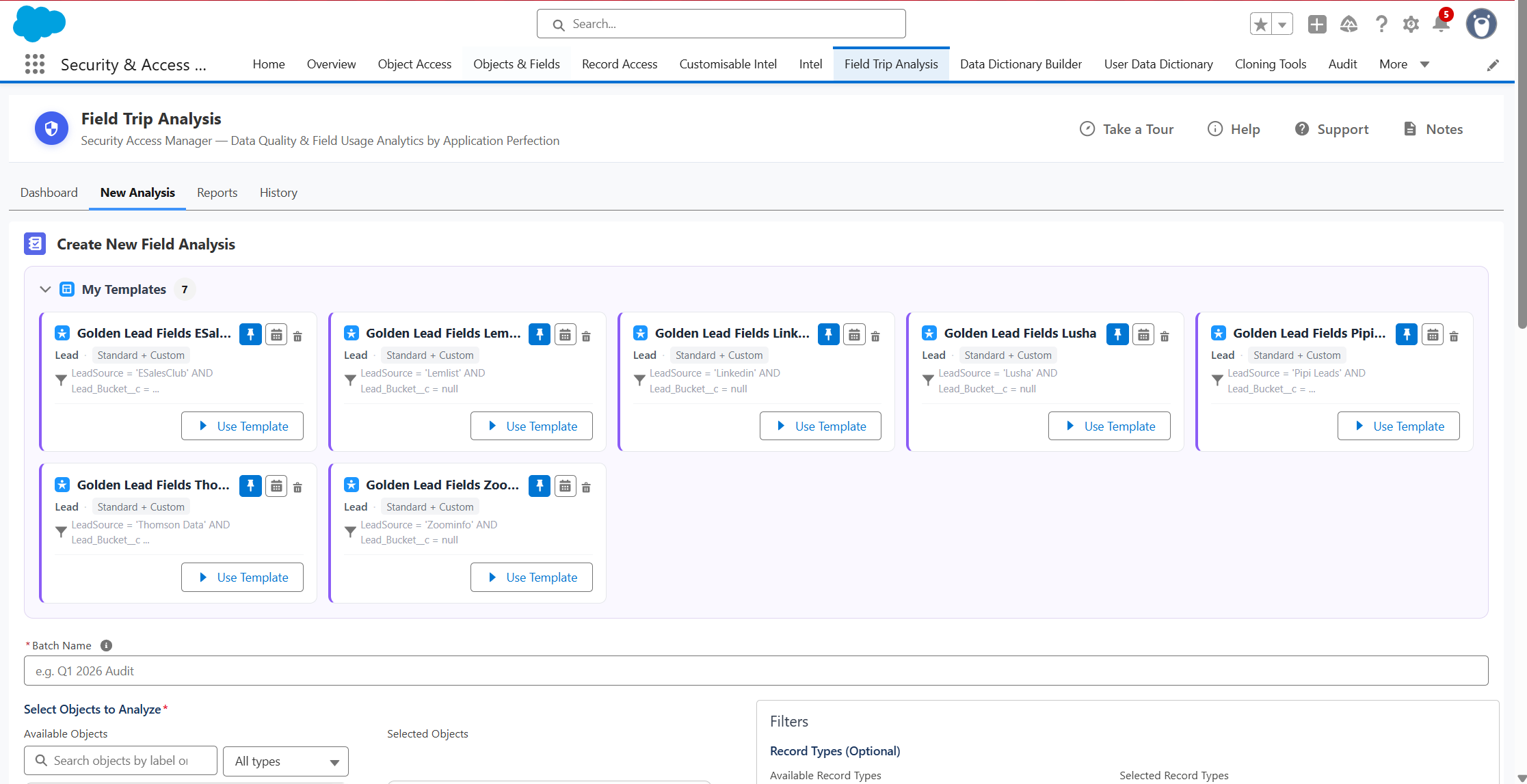
Save commonly used selections and analysis criteria as reusable templates. Teams can repeat the same checks during future reviews, apply a more consistent governance process and avoid rebuilding their analysis configuration each time.
Schedule field analyses to run automatically and distribute the results by email. Dashboards and exportable reports make it easier to monitor progress, share findings with stakeholders and maintain an ongoing field-governance process.
- Field Population Analysis
See how frequently every field is populated and quickly identify fields that are heavily used, rarely completed or completely empty. - Data Quality Scoring
Measure average field-population levels across each analysis to understand data completeness and track improvements over time. - Multi-Object Analysis
Analyse up to five standard, custom or managed-package objects in a single run for a broader view of your Salesforce data model. - Targeted Record Analysis
Focus analysis using Record Types, Last Modified Date ranges and custom SOQL filters to assess the records that matter most. - Automated Cleanup Recommendations
Automatically classify fields as Keep, Review or Remove, helping admins prioritise cleanup candidates without reviewing every field manually. - Populated Record Drill-Down
Open the records behind each population result to see where a field is being used, when it last changed and who made the change. - Record Type and Segment Analysis
Understand whether a field is used across the whole object or is especially important to one Record Type or business process. - Page Layout Visibility
See which page layouts contain each field, which layouts are missing it and whether the field is visible to the current user.
- Security Exposure Analysis
Review how widely each field is accessible through Profiles and Permission Sets before changing or retiring it. - Dependency Discovery
Identify where fields are referenced across Apex, Flows, Email Templates, Reports, Page Layouts and Lightning Record Pages. - Deletion Risk Analysis
Combine field population, security exposure, layout visibility and dependencies into a clear deletion-risk assessment before making changes. - Reusable Analysis Templates
Save repeatable analysis configurations for recurring audits, governance checks and cleanup projects. - Scheduled Analysis
Run analyses automatically on a weekly, monthly or quarterly basis and email the results directly to the person responsible. - Dashboards and Quick Actions
View total analyses, fields assessed, average data quality and unused fields, or immediately run common Account, Contact and Opportunity analyses. - Export and Share Reports
Export the current Object Population results to CSV or email reports to selected recipients. - Analysis History and Trend Tracking
Retain completed analyses, reopen previous reports and compare field counts, record volumes and data-quality scores over time.
Need to get your field cleanup under control? Book a tailored demo
30 min walkthrough. No prep needed
One workspace. Clearer field review.

1
Select objects
Choose one or multiple Salesforce objects to analyse and review.

2
Configure or reuse
Apply filters, select the field types you need, use a saved template, or schedule a recurring run.

3
Review usage & risk
See population levels, layout visibility, access exposure, dependencies, & automatically generated recommendations.
4
Export & share
Export results to CSV or email a stakeholder-friendly report for review, cleanup planning, or audit evidence.
Field Trip Analysis is one part of a broader governance picture
Field Trip Analysis shows which fields are still earning their place.
The suite covers the permissions, users, and audit work around them.
Part of the Security + Access Manager Suite
Eight apps. One workflow covering permissions, users, audits, reports, and metadata.
Field Trip Analysis can be installed as a standalone app or as part of the full suite.

Ready to stop guessing which fields are still useful?
In a tailored demo we'll show you:
• How Field Trip Analysis identifies low-usage fields and cleanup risk
• How layout visibility and dependency checks work in one analysis
• How to export and share results for cleanup planning and stakeholder review
30 minutes. No prep needed. No credit card required.