












Report libraries drift out of control.
Reports accumulate, and you can't tell which still matter.Some feed dashboards. Some are subscribed or scheduled. Some look stale but still get used. Salesforce shows you the list, not what's safe to remove.So you hesitate, and the drift continues.
Clean-up clarity gives admins the confidence to act.
Open the dashboard. See your report total, what hasn’t run, and where to start.
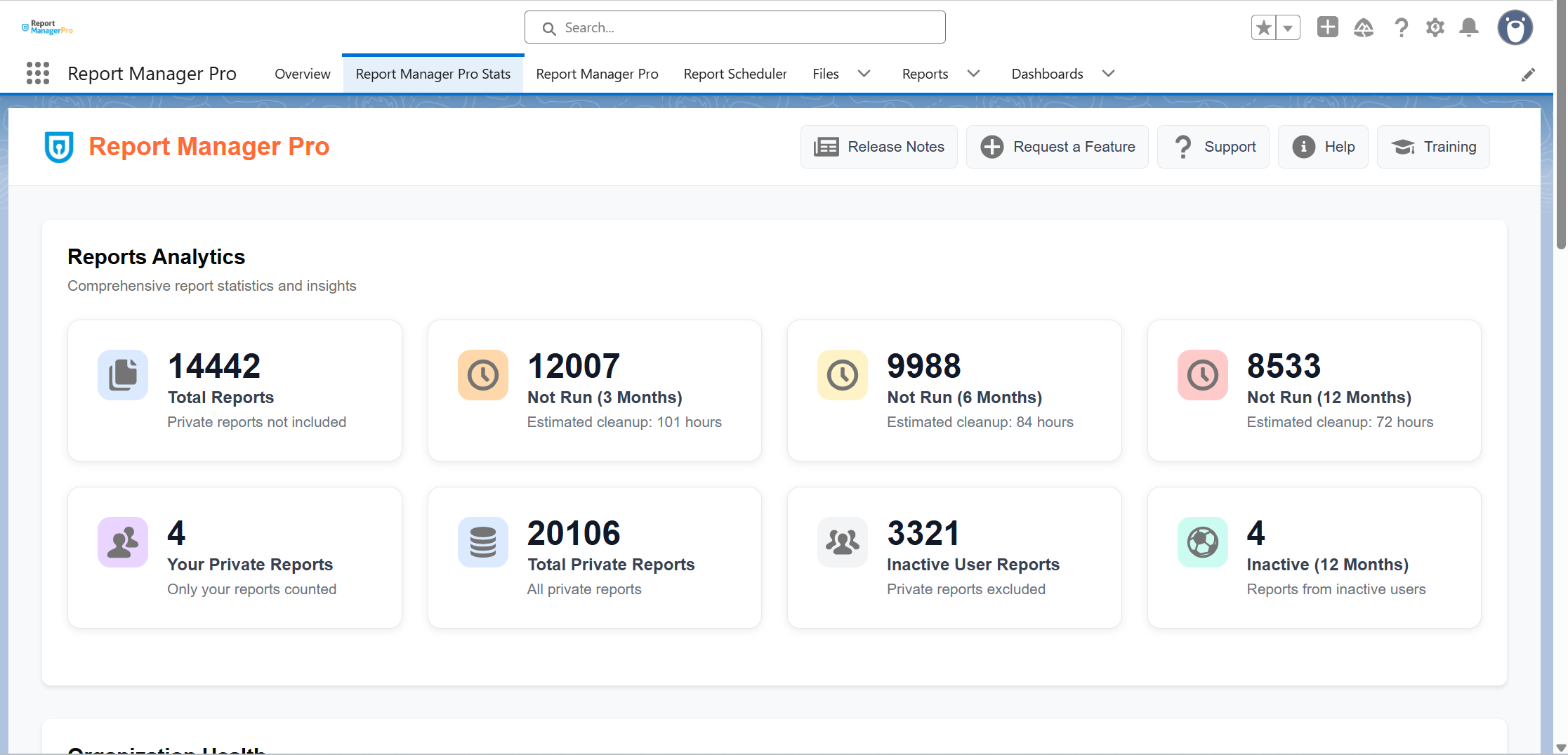
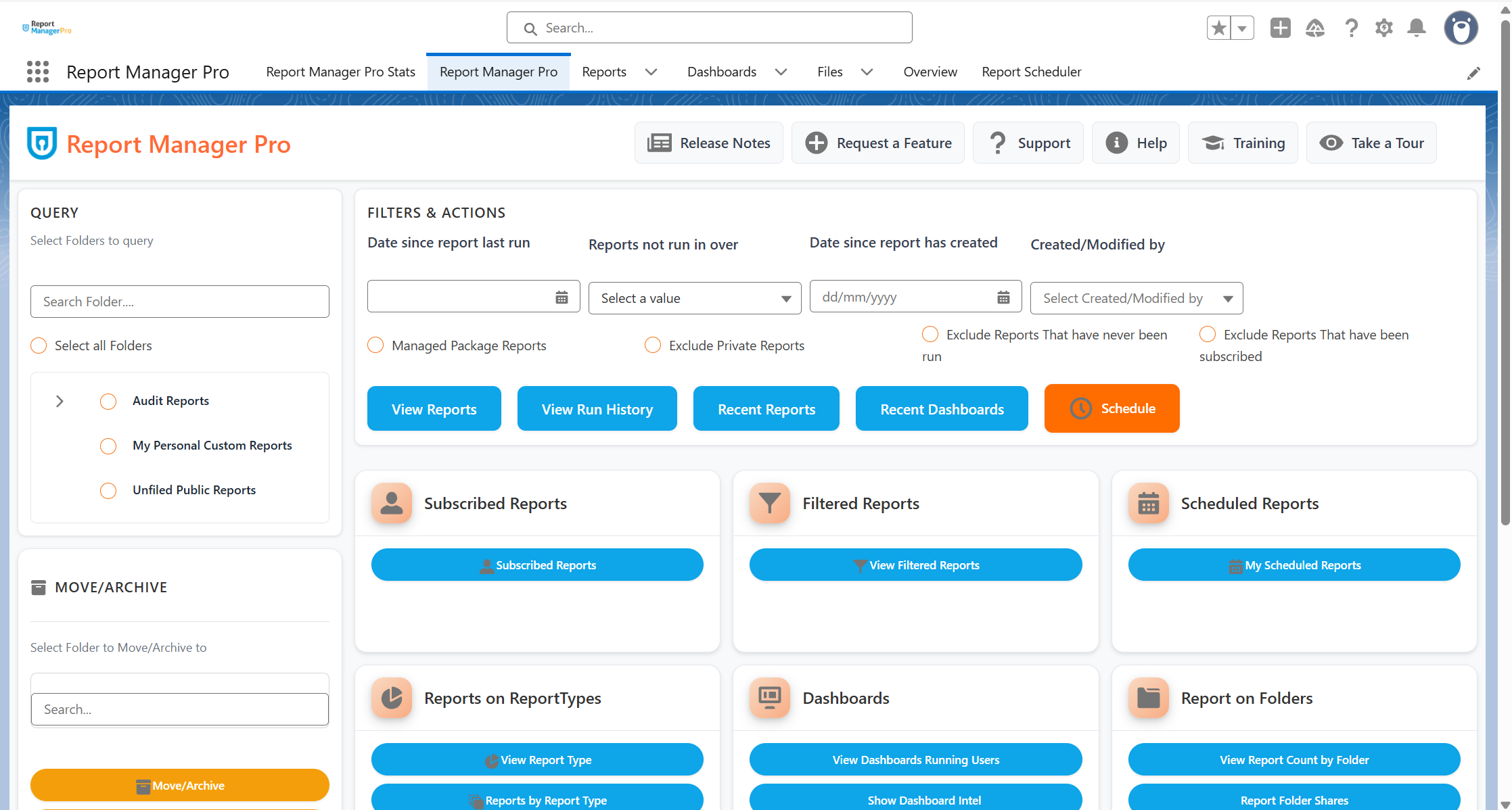
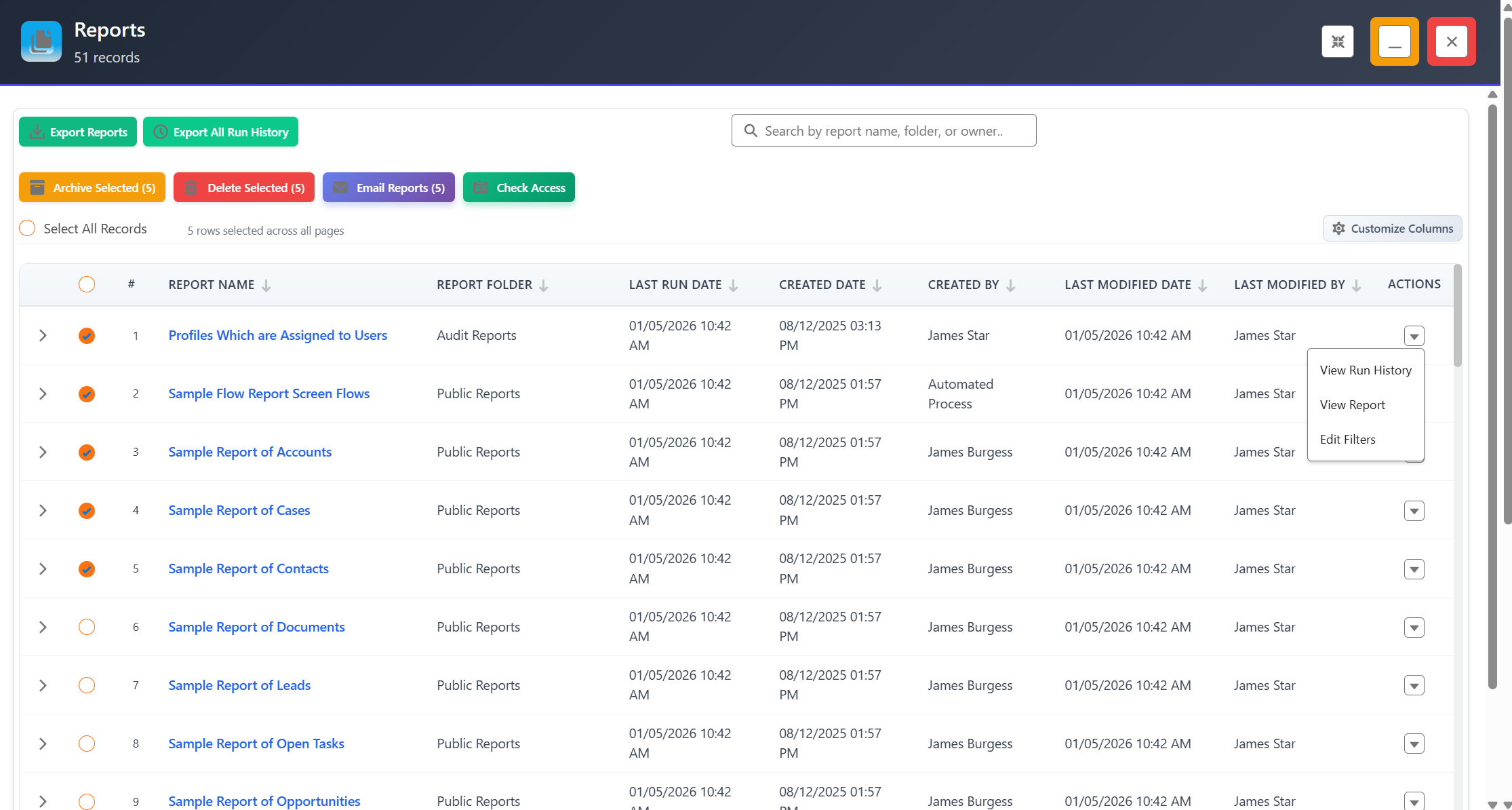
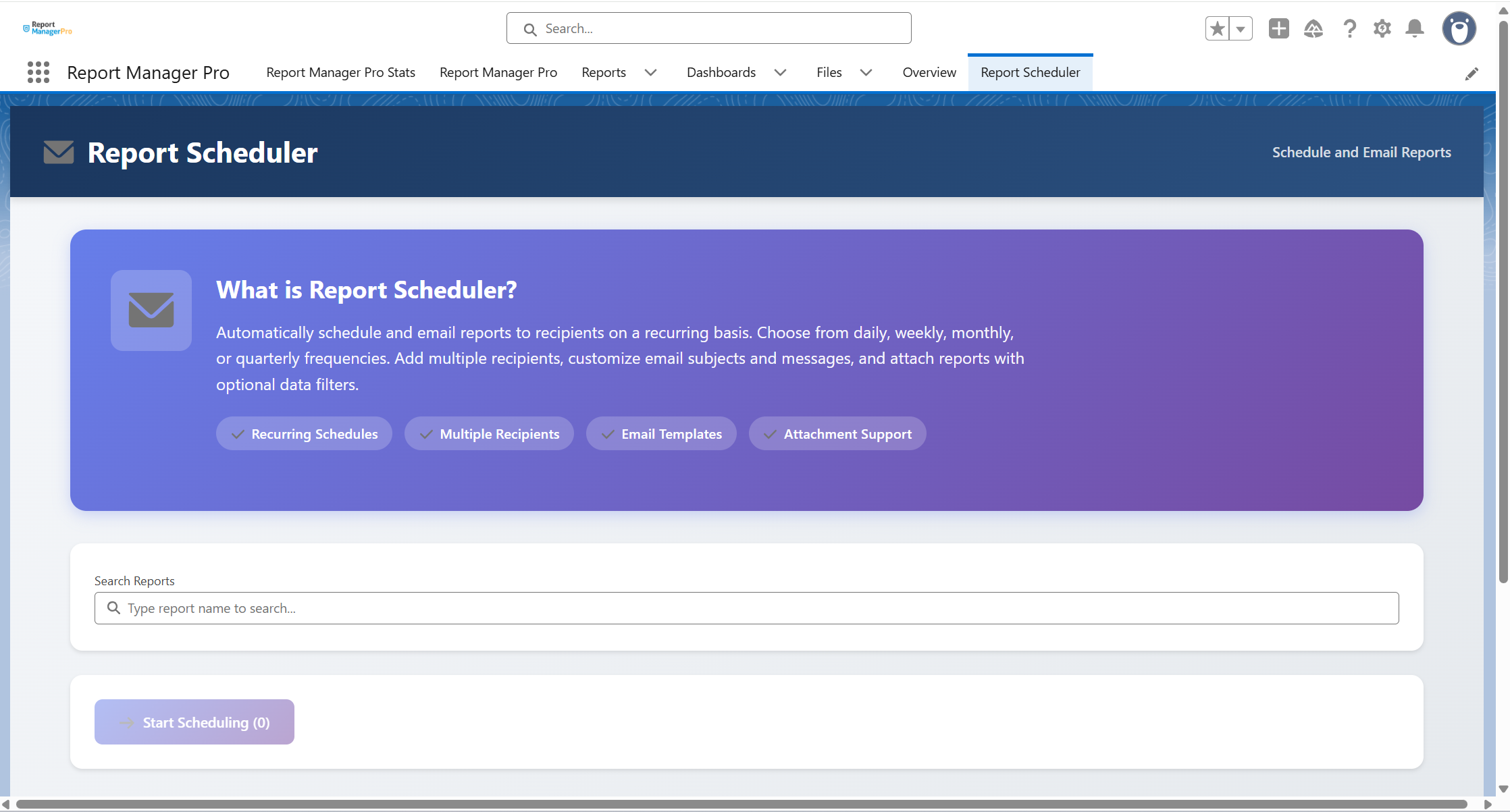
Review usage, folders, dashboards and schedules before clean-up.
Salesforce lists reports.Report Manager Pro declutters them.
Spot stale reports. Check what's safe. Clean up in bulk.


Report usageat a glance
See total reports and what hasn't run in 3, 6, or 12 months.

Filter,then act in bulk
Filter by last run, owner, or date. Archive, move, or delete in bulk.

Check beforeyou remove
See which reports feed dashboards, carry subscriptions, or are scheduled.

Evidence andcleanup case
Export filtered lists to Excel. Quantify the manual clean-up effort.
Unmanaged reports are reporting debt.Report Manager Pro clears it safely.
Manual folder checks
One filtered clean-up list
with Report Manager Pro
"Report clean-up used to mean checking folders, dashboards, and subscriptions one by one. With Report Manager Pro, we see usage, check what’s safe, and export a clean sign-off list."


Stephanie Poorman

Salesforce wasn’t built to keep reports under control.
Here's where that gap shows up across five everyday report management tasks.
Salesforce Setup
With Report Manager Pro
Identifyingstale reports
Review reports and folders manually,then check usage report by report.
Filter the catalogue by last run date, created date, modified date, creator and folder.
Checking what issafe to remove
Open dashboards, subscriptions and schedulesseparately to see what is still being used.
See which reports feed dashboards, carry subscriptions or run on a schedule before taking action.
Moving, archivingor deleting reports
Delete reports manually, with no archivefolders or scheduled clean-up.

Archive, move or delete selected reports in bulk, or schedule recurring clean-up.
Reviewing customreport types
Check report types separately, with no view of which reports depend on them

Every save generates a log entry.
Revert to any previous state.
Including private& managedpackage reports
Harder to find and assess, so they usually sit outside the review
Include private, managed package and unused reports in the same review
Tidying folderstructure
Review folders manually and remove empty ones one at a time
Review folder structures and remove empty folders in the same pass
Justifying theclean-up effort
No native way to quantify what a manual clean-up would cost
Generate a business case that quantifies the manual effort involved
Sharing theshortlistfor sign-off
Build the list outside Salesforce
Export filtered report lists and folder structures to Excel for review and sign-off
Twelve ways Report Manager Pro goes further
Turn a large report catalogue into a manageable review list. Filter reports by criteria including last run date, created date, modified date, creator and folder to quickly surface stale, old or potentially redundant reports that need attention.
Take action on multiple reports at once instead of managing them individually. Select the reports you want to clean up, then archive, move or delete them in bulk once you are confident they are no longer required.
Identify reports that are configured to run on a schedule before making clean-up decisions. See scheduled report activity alongside the wider report catalogue so automated reporting is not accidentally disrupted.
See which reports are being used by Salesforce dashboards before deciding whether they are safe to remove. Quickly identify dashboard dependencies without opening dashboards and tracing their source reports individually.
Find reports with active subscriptions so you know which reports are still being delivered to users. Include subscription activity in your review before archiving or deleting reports that may still be relied upon.
See which reports are built from each report type and identify custom report types that may no longer be needed. This gives admins the evidence needed to safely review redundant report types, particularly when approaching Salesforce limits.
Export filtered report lists and folder structures to Excel for stakeholder review, audit evidence or sign-off. Share a clear clean-up shortlist without manually rebuilding report information outside Salesforce.
Bring reports that are easy to overlook into the same review process, including private and managed-package reports. Get a more complete picture of the report catalogue instead of limiting clean-up to the reports that are easiest to find.
Move reports into archive folders before permanently deleting them. Remove stale content from active reporting areas while giving your team a safer intermediate step when there is still uncertainty about whether a report may be needed again.
Generate a business case showing the effort involved in cleaning up reports manually. Quantify the scale of the work to help demonstrate the value of structured report management and build a stronger case for clean-up with stakeholders and management.
Schedule recurring report clean-up instead of repeating the same manual process each review cycle. Automate archive or deletion activity based on your chosen criteria to help prevent report clutter from building back up over time.
Review the structure around your reports as well as the reports themselves. Identify and remove empty folders and review folder sharing so the wider reporting catalogue stays organised and easier to govern.
- Identify Reports not run in specified time frame.
- Archive or mass delete Reports now or create a schedule.
- Review intel for Filtered, Scheduled, Subscribed and Shared Reports in Folders and Dashboards.
- Report showing which reports are built on which report type informs you to make the decision to remove redundant custom report types – useful if you are hitting the Salesforce limit.
- A brand-new capability to allow you to query reports based on created date, last modified, and created by values.
- ‘Generate Business Case’ button. Allowing you to quantify the amount of effort it would take to clean up reports manually, building credibility with management and actively encourages report management and auditing, keeping everything under control.
- Ability to delete archived reports individually rather than all at once, for those ‘let’s wait and see’ moments when you’re not 100% sure no one wants the report anymore.
Ready to clear the clutter with confidence? Book a tailored demo
30 min walkthrough. No prep needed
Filter first. Clean up decisively.

1
See the full picture
Open the dashboard. View your total reports, what hasn't run, and where the clutter sits.

2
Filter the list
Narrow by last run date, owner, created date, modified date or folder to build a clean-up shortlist.

3
Check what's safe
See which reports feed dashboards, carry active subscriptions or run on a schedule before acting.

4
Archive or delete
Act in bulk, schedule recurring clean-up, or remove archived reports one at a time.
Report Manager Pro is one part of a broader governance picture
Report Manager Pro keeps reporting clean and reviewable.The Suite keeps the surrounding governance from drifting out of shape.
Part of the Security + Access Manager Suite
Eight apps. One workflow covering permissions, users, audits, reports, and metadata.Report Manager Pro can be installed as a standalone app or as part of the full suite.
Ready to stop sifting through report clutter?
In a tailored demo we'll show you:
• How usage filters surface stale and low-use reports• How dashboard, subscription and schedule checks reduce clean-up risk• How bulk actions, scheduled clean-up and exports keep reporting under control
30 minutes. No prep needed. No credit card required.