












Permissions reviews are fragmented.
Last cycle’s notes sit somewhere. Ownership of the next step is unclear.When someone asks “when was this last reviewed?”, the answer takes hours to find across old emails, spreadsheets, and meeting notes.Each audit becomes a reconstruction job, not a continuation of the last one.
One audit workspace cuts through this.
Built inside Salesforce, where the permissions data already lives.
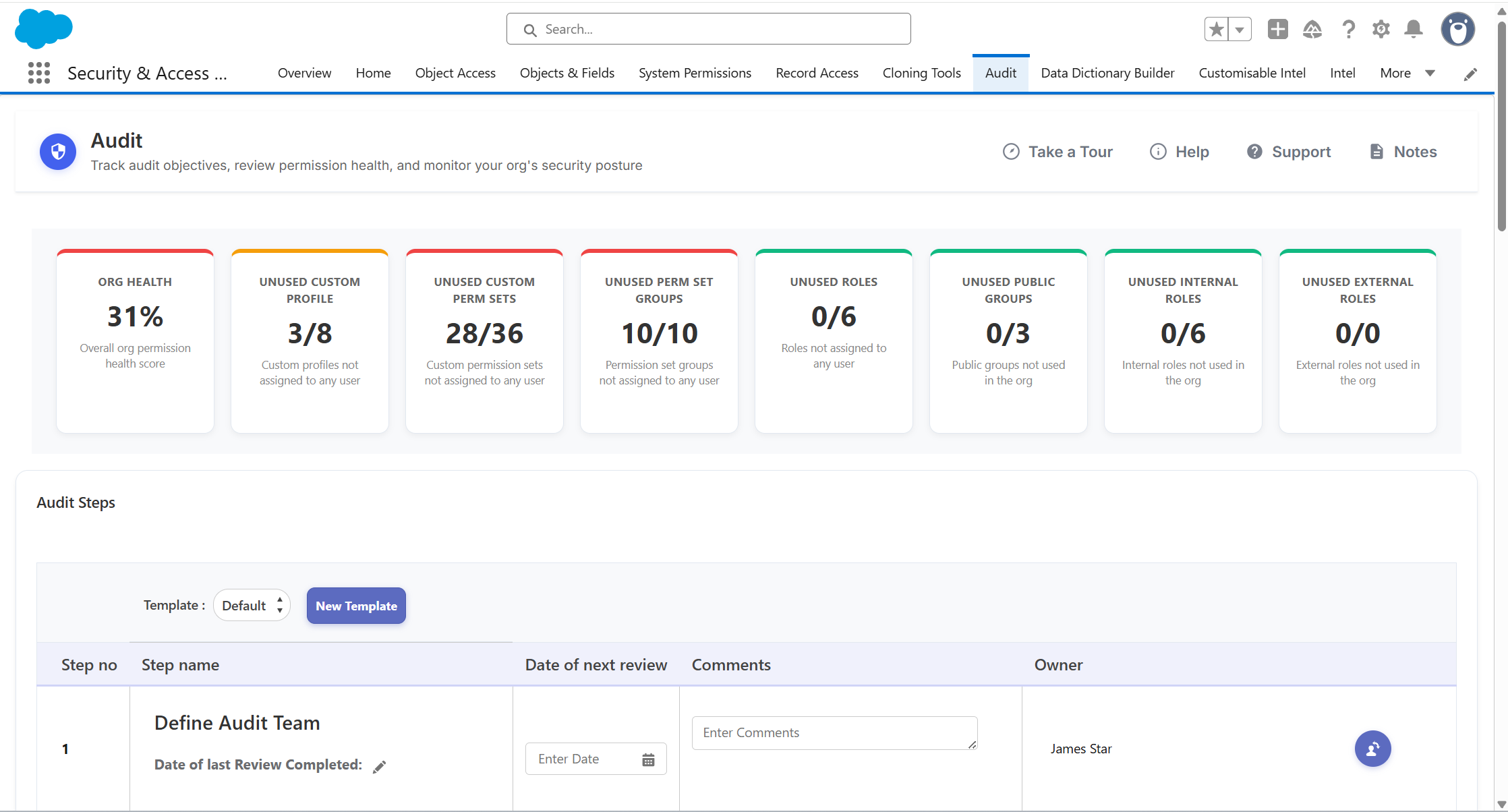
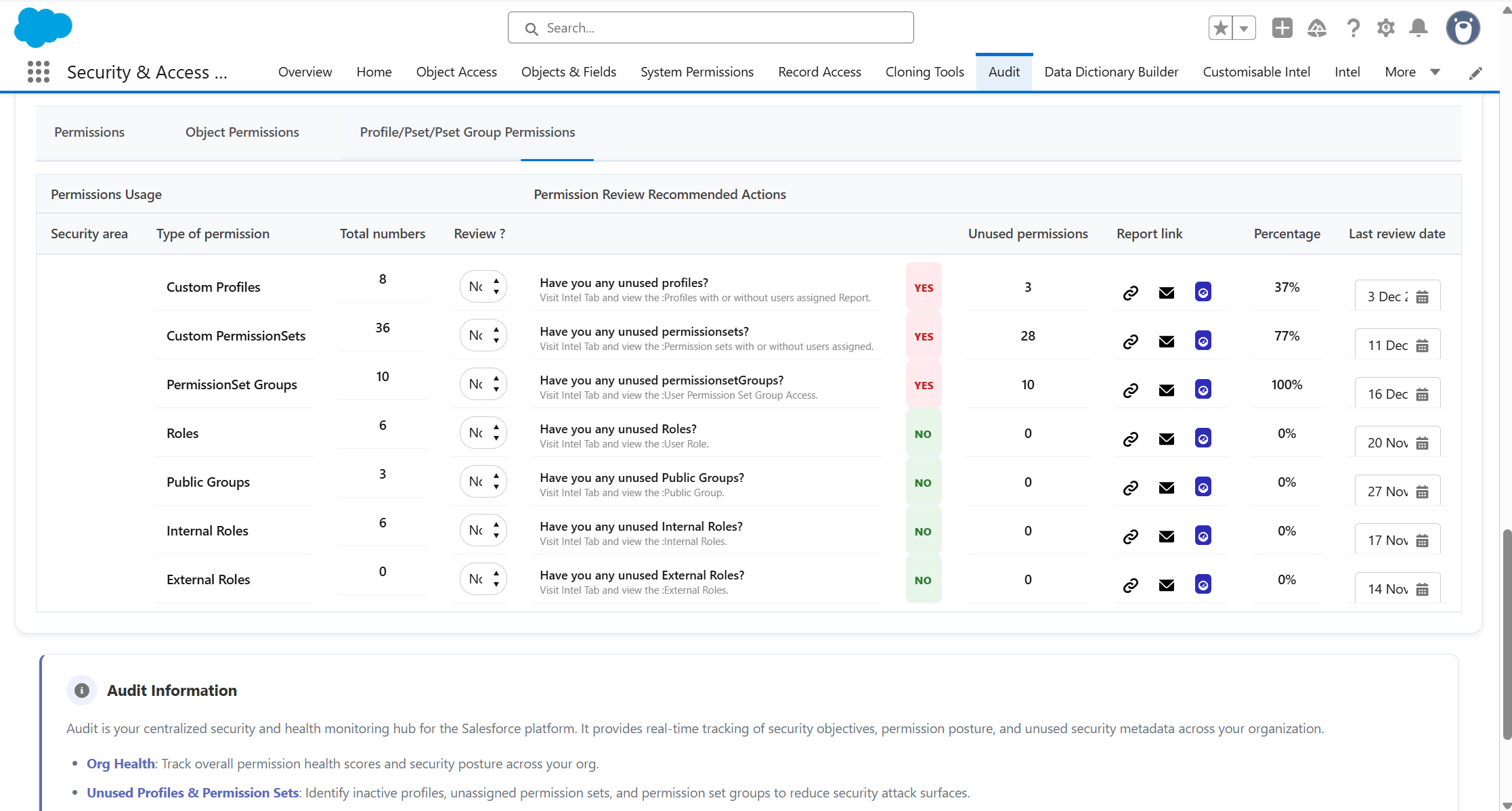
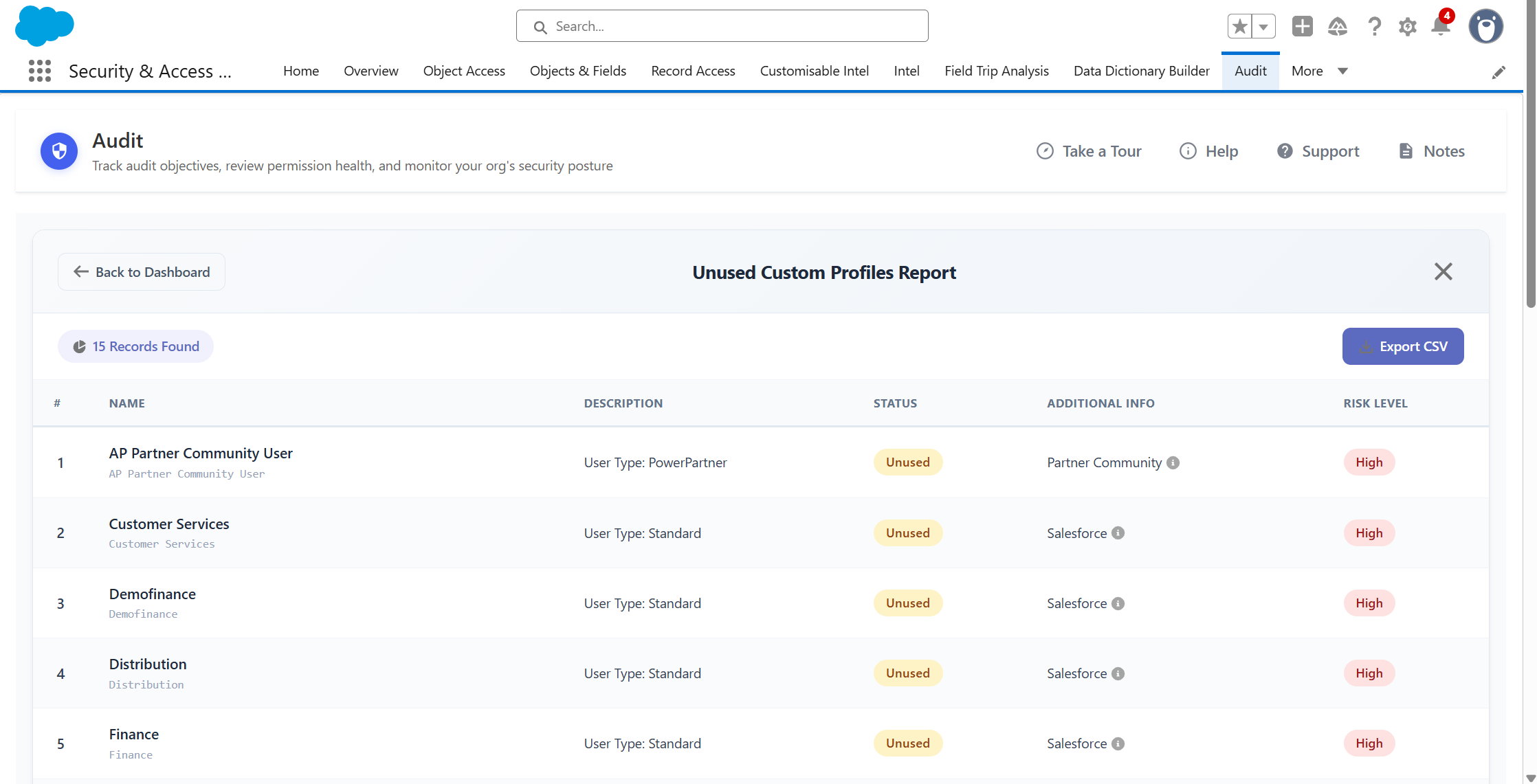
Open the audit workspace. See review status, owners, and dates in one view.
Setup grants access.Permissions Audit Planner Pro reviews it.
Structured workflows, clear ownership, audit-ready evidence.


Reusableaudit workflows
Build a structured audit plan onceand reuse it for each review cycle.

Live OrgHealth Dashboard
See unused profiles, permission sets, permission set groups, roles, and public groups in one view.

Assigned ownership and tracked progress
Assign Salesforce users to individual audit steps with automatic email notification.

Point-in-timeexportable evidence
Download review outputs to Excel at any stage of the process.
Reviews without a trail are an audit risk.Permissions Audit Planner Pro builds the trail as work happens.
When was this last reviewed?
Answered in seconds, not hours.
with Permissions Audit Planner Pro
"Perform an audit and track all changes made too. Keep those external auditors happy. For large organisations with complex security requirements, it’s a must have."


Daryl Moon

Setup wasn’t built to planor track audits.
Here’s where that gap shows up across eight common audit and review tasks.
Salesforce Setup
With Permissions Audit Planner Pro
Auditworkflow planning
No native audit workflow capability

Build reusable audit plans with stages, owners, and deadlines
Assigningaudit reviewers
No way to assign and notify reviewers
Assign Salesforce users to audit steps with automatic email notification
Trackingreview completion
No native review status tracking

See completion dates, comments, and next review dates in one workspace
Unused-permissionsvisibility
No native dashboard for unused components
Live counts and percentages of unused profiles, permission sets, roles, and groups
Auditevidence export
No native audit export
Point-in-time outputs downloadable to Excel for compliance and audit teams
Classifying high-riskpermissions
No native way to mark a permission as privileged
Maintain a register of privileged permissions and review them as a defined group
Checking objectdescription coverage
Open objects one at a time to see what is documented
Object description coverage reviewed as part of the audit plan
Lastreview dates
No native last-reviewed date
Last review dates tracked across permission areas, with overdue items visible
Eight ways to do what setup can't
Create a structured permissions audit process inside Salesforce. Break each review into defined stages and tasks, assign responsibility, set deadlines, add comments and track progress from one central workspace.
Standardise recurring reviews by creating reusable audit templates. Use predefined structures or build your own process once, then reuse it for future audit cycles rather than rebuilding the review from scratch.
See the health of your Salesforce access model at a glance. Surface unused profiles, permission sets, permission set groups, roles and public groups so administrators can quickly identify areas that need review or cleanup.
Maintain a central register of permissions your organisation considers privileged or high risk. Group these permissions together so they can be reviewed consistently as part of your audit process.
Review whether Salesforce objects have been properly documented as part of your wider governance process. Identify gaps in object descriptions and include documentation coverage within scheduled audit activity.
Track when key permission areas were last reviewed and when they are due to be reviewed again. Overdue items are clearly visible, helping administrators prioritise work and maintain a consistent review cycle.
Capture the state of your review at a specific point in time and export the results to Excel. Give auditors, security teams and stakeholders clear evidence of what was reviewed and the status of the audit.
Schedule recurring permission reviews so important checks are not forgotten. Assign Salesforce users to audit activities, set review dates and use email notifications to keep owners aware of their responsibilities and upcoming work.
- Customizable, Guided Audit Workflows. Define deadlines, assign tasks, and monitor progress—all from a user-friendly home tab.
- Real-Time Org Health Dashboard. Instantly see which permissions are in use, identify risky or unused settings, and tackle “tech debt” early.
- Automated Reminders & Reporting. Schedule compliance reviews so you never miss a critical deadline. Export results to Excel for broader visibility across teams.
- Build an audit process customised with deadlines and comments for your business
- Live overview of permissions health of your org
- Know how many permissions are/are not in use
- Guided actions in the app to resolve issues
- Report on audit results and export results to Excel
- Suite of dashboards highlighting utilized vs unused permissions (tech debt)
- Schedule reminders for permission reviews so you never miss an important deadline
for compliance. - Assign owners to different audit steps and notify them of the details and their responsibilities within the full audit process.
- The tool makes it easier for the owner of the audit process to communicate to their team and make sure nothing gets missed through oversight.
Want to understand how it improves your workflow? Book a tailored demo
30 min walkthrough. No prep needed
Plan once. Reuse the structure.

1
Open the audit workspace
Start from the Org Health Dashboard to see where review attention is needed and what’s overdue.

2
Build or selecta template
Use a built-in template or create your own. Define stages, owners, and deadlines once.

3
Assignand track
Assign Salesforce users to audit steps with email notification. Comments and dates capture as work happens.
4
Exportthe evidence
Download point-in-time outputs to Excel for audits, internal reviews, or stakeholder updates.
Permissions Audit Planner Pro is one part of a broader governance picture
Permissions Audit Planner Pro runs your audit and review process.The Suite brings the access management, risk detection, and reporting into the same workflow.
Part of the Security + Access Manager Suite
Eight apps. One workflow covering permissions, users, audits, reports, and metadata.Permissions Audit Planner Pro can be installed as a standalone app or as part of the full suite.
See any user's full access, risk score and login history, and grant or revoke in one place.
Move profiles to permission sets in three clicks, or clone one user's access to another in seconds.
Compare and bulk-edit permissions across profiles and permission sets, with a full audit trail.
Ready to stop running audits from scattered notes?
In a tailored demo we'll show you:
• How the Org Health Dashboard shows what needs review next• How reusable templates, owners and dates keep audits on track• How point-in-time exports evidence what was reviewed, when and by whom
30 minutes. No prep needed. No credit card required.